
English Русский
Български
Беларускі
Український
Српски
Hrvatski
Română
Polski
Slovenský
Magyar
Articles Bookmark Contacts Sitemap   
Company Audi Company Ford Company Hyundai Company Kia Company Mazda Company Mercedes-Benz Company Nissan
MitsubishiMan.ru


Home Colt Lancer Galant L200 Outlander Pajero Others
L200 4 (2005-2014, diesel)

Checking the acceleration sensor (Mitsubishi L200 4)

  • Home
  • L200
  • 4 (2005-2014, diesel)
  • Chassis and running gear
  • Brake system
  • Checking the acceleration sensor
0
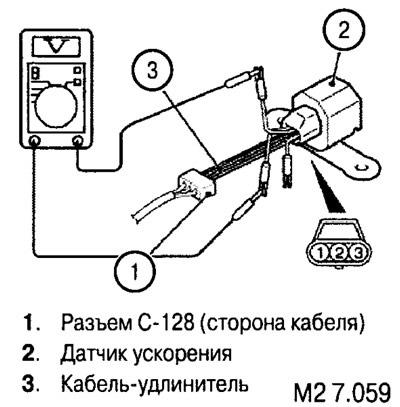
Disconnect the acceleration sensor connector and connect a special test cable (an extension cable-adapter to enable the sensor to be rotated to check the voltage under the effect of the own weight of the moving parts of the sensor's sensitive element) to the sensor and to the connector. Turn on the ignition and measure the voltage between terminals 1 and 2. It should be 2.4-2.6 V.


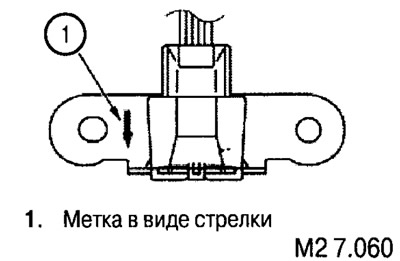
Without disconnecting the test cable, turn the sensor so that the arrow points straight down. Measure the voltage between terminals 1 and 2. It should be 3.55-3.95 V.


If the measurement results are outside the specified values, measure the voltage between terminals 3 and 1. Standard value: 4.75-5.25 V.

Article reprinted from the website MitsubishiMan.ru


Note: If the circuit is interrupted or short-circuited in the acceleration sensor, the power supply to the sensor is cut off within 2 seconds after the ignition is turned on.


If the measured values of the first two tests are outside the specified limits, and the value of the third test complies with the standard, the acceleration sensor must be replaced.

If all measured values are not within the standard, check the wiring. If the wiring is normal, the ABS-ECU may be faulty.
This article is available at: russian, bulgarian, belarusian, ukrainian, serbian, croatian, romanian, polish, slovak, hungarian
This article was reviewed by: Nikita Romanov
Share with friends:
◀ Previous
L200 4: Brake system
Next ▶

Removal and installation the acceleration sensor
Checking wheel speed sensors
Removal and installation wheel speed sensors
Measuring the output voltage of the wheel speed sensor
Wheel speed and acceleration sensor
ABS warning light
Electronic-hydraulic unit ABS
Controlling brake fluid pressure by the ABS system
Controlling brake fluid pressure with EBD system
Self-diagnosis and fault codes of the ABS system
Similar materials for other Mitsubishi models

➤ Oil pressure and pressure sensor — checking Mitsubishi Colt 4 and 5 (1991-2003)
➤ Checking the oil pressure switch sensor Mitsubishi Lancer 3 and 5 (1984-1992)
➤ Checking and replacing the coolant temperature sensor unit Mitsubishi Galant 6 and 7 (1987-1998)
➤ Checking the engine oil pressure switch sensor Mitsubishi Outlander 1 (2003-2008)
➤ Checking the crankshaft speed sensor Mitsubishi Pajero 1 and 2 (1982-1999)
➤ Checking the clutch release sensor Mitsubishi Carisma (1995-2004)
Link in different formats to this article
Comments and feedback from visitors
No comments yet


Add up two numbers 42 + 42


L200 4 (2005-2014, diesel) 
  • General information
  • User manual
  • Maintenance
  • Power unit
  • Diesel engine
  • Lubrication system
  • Fuel system
  • Control system
  • Transmission
  • Clutch
  • Mechanical gearbox
  • Transfer case
  • Front axle
  • Rear axle
  • Chassis and running gear
  • Car suspension
  • Steering
  • Brake system
  • Body and interior
  • Exterior (external elements)
  • Interior (internal elements)
  • Doors, locks and windows
  • Electrical equipment
  • Equipment and devices
  • Electrical circuits
MitsubishiMan.ru © 2018–2026 • Mobile version • Articles about Mitsubishi • Contacts • Sitemap: EN BG BY UA RS HR RO PL SK HU • Site search • Bookmark
Colt 2 and 3 (1983-1993) · Colt 4 and 5 (1991-2003) · Colt 5 (1995-2003) · Lancer 3 and 5 (1984-1992) · Lancer 9 (2000-2007) · Galant 5 (1983-1989) · Galant 6 and 7 (1987-1998) · L200 4 (2005-2014) · Outlander 1 (2003-2008) · Pajero 1 and 2 (1982-1999) · Pajero 4 (2006-2021) · Carisma (1995-2004) · Space Star (1998-2005) ·
This resource sets cookies 🍪 to avoid bothering you with repeated data entry.