



From the driver's door panel, you can control the position of the windows of all doors, as well as lock them using the corresponding switch.
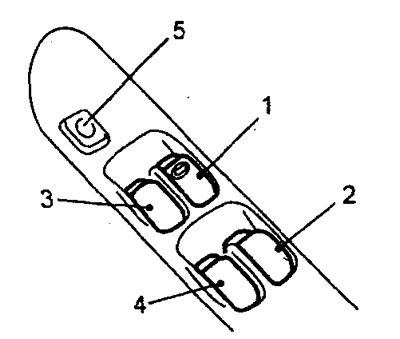
1 - driver's door power window switch, 2 - rear right door power window switch, 3 - front left door power window switch, 4 - rear left door power window switch, 5 - power window lock switch.
On the panel of each passenger door there is a switch, by pressing and holding which the passenger can adjust the position of the glass only on his side.
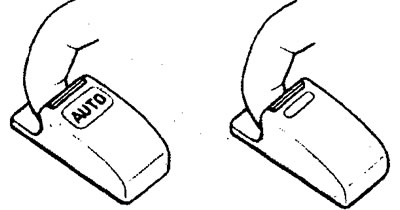
When you lightly press the driver's door window switch, the glass will go down as long as the switch is held. To raise the glass, you need to lightly pull the switch up and hold it in this position until the glass is completely raised. The window switches for all doors have an additional function - full lowering and full raising of the door glass (AUTO), in which there is no need to hold the switch in the corresponding position.
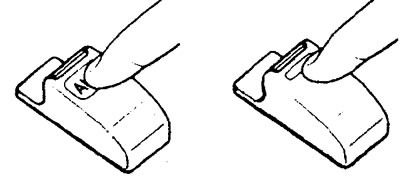
To lower the glass, press the switch to the end of its stroke. If you need to stop the glass in a slightly open position, briefly press the switch up and lower it again. To raise the glass, pull the switch up to the end of its stroke.
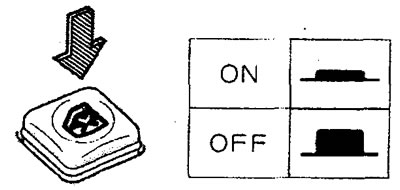
On the main control panel of the window lifters there is a switch for blocking the window lifters "WINDOW LOCK". When it is pressed, it is impossible to lower the windows, except for the driver's door window.
Note: The driver's door window can be lowered/raised for 30 seconds after the ignition key is turned to the "ACC" or "LOCK" position. If the driver's door is opened during this period, the system will stop functioning after the door is closed.
Anti-pinch system
If an object gets between the glass and the frame while the door glass is being raised, the glass will automatically lower slightly and stop. Note: there is a zone, an opening where the glass meets the frame, where the system cannot detect the object and will not operate. Be careful not to pinch your fingers.
The article is reprinted from this source: mitsubishiman