



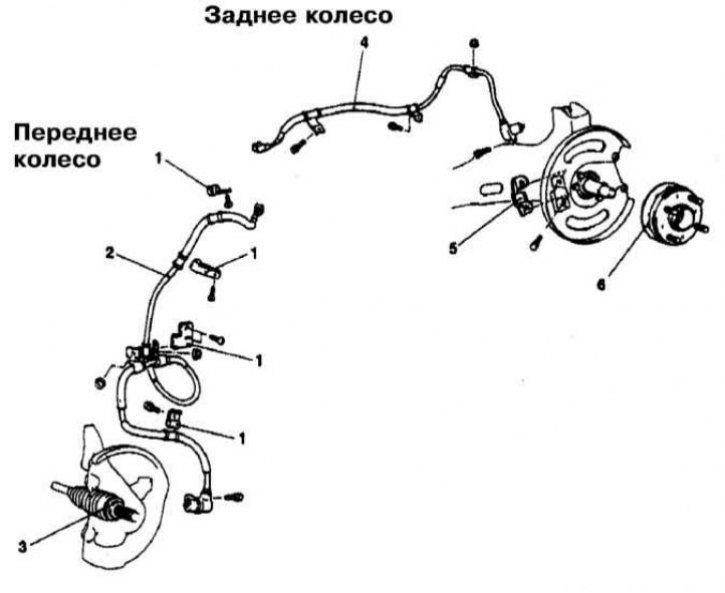
Front and rear wheel speed sensor installation details for Mirage models
1 - Retainer; 2 - Front wheel speed sensor; 3 - Sensor rotor; 4 - Rear wheel speed sensor; 5 - Sensor support bracket; 6 - Sensor rotor
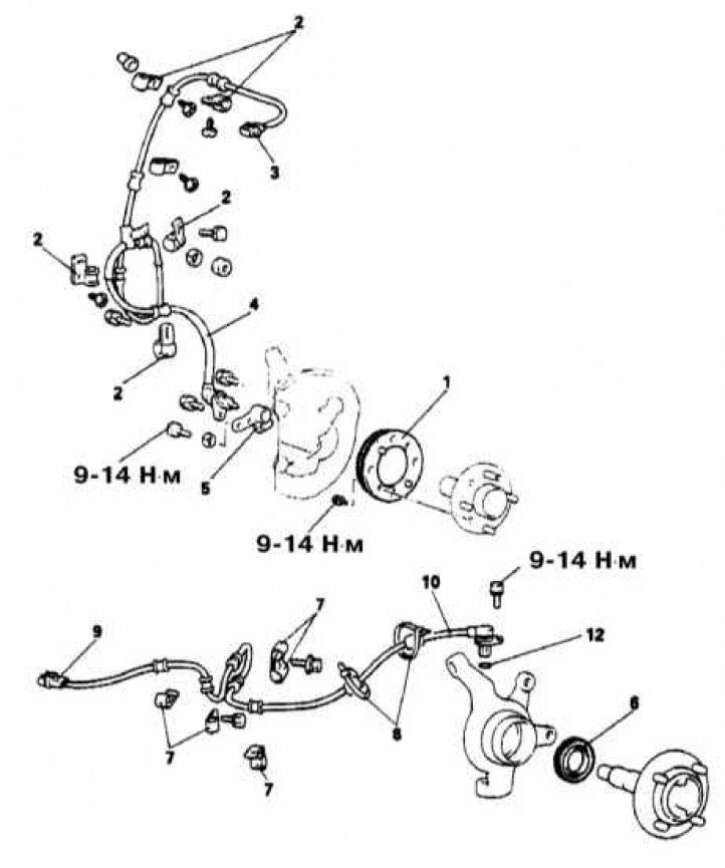
Wheel sensor installation details for Galant AWD models through 1993.
1 - Front wheel speed sensor rotor; 2 - Retainer; 3 - Front wheel sensor wiring connector; 4 - Front wheel speed sensor; 5 - Sensor support bracket; 6 - Rear wheel speed sensor rotor; 7 - Retainer; 8 - Bandage; 9 - Rear wheel sensor wiring connector; 10 - Rear wheel speed sensor; 12 - Sealing ring
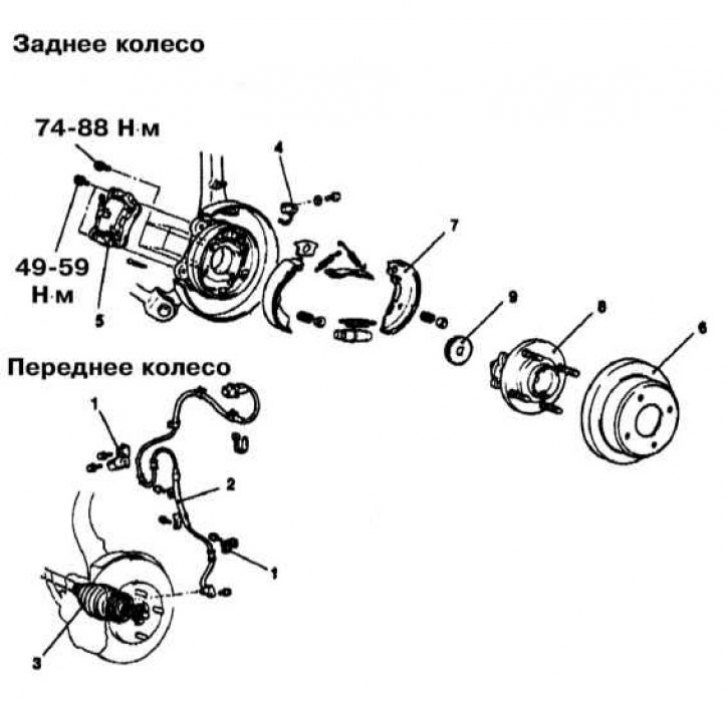
Wheel sensor installation details for Galant AWD models from 1994 onwards.
1 - Retainer; 2 - Front wheel speed sensor; 3 - Drive shaft; 4 - Rear wheel speed sensor; 5 - Brake caliper; 6 - Brake disc; 7 - Shoe assembly; 8 - Hub assembly; 9 - Sensor rotor
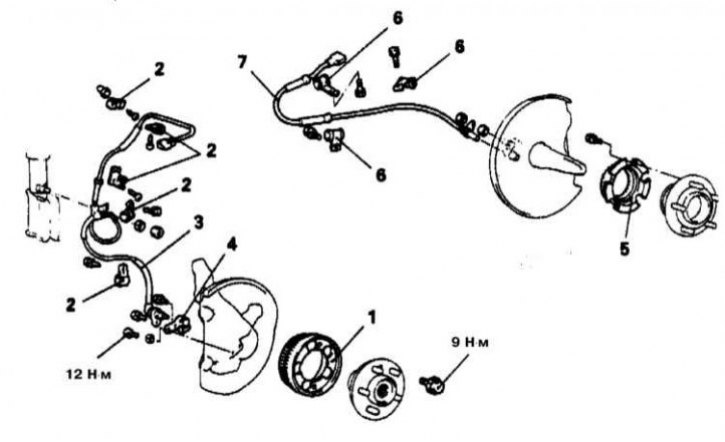
Wheel sensor installation details on Diamante models
1 - Front wheel sensor rotor; 2 - Retainer; 3 - Front wheel speed sensor; 4 - Front wheel sensor support bracket; 5 - Rear wheel sensor rotor; 6 - Retainer; 7 - Rear wheel speed sensor
Front wheel speed sensors
Removal
1. Front wheel speed sensor installation details on Mirage models are shown in the illustration.
2. Disconnect the negative cable from the battery.
Warning! If the car stereo system is equipped with a security code, make sure you have the correct combination to activate the audio system before disconnecting the battery! To avoid triggering the airbags, wait at least 90 seconds after disconnecting the battery before removing the sensor.
3. Jack up the car and place it on supports. Remove the corresponding wheel.
(The original material is here: www.mitsubishiman.ru)
4. Remove the wheel arch protection liner.
5. Disconnect the electrical wiring from the wheel sensor.
6. Remove the sensor wiring harness fastening clips.
7. Remove the sensor from the support bracket.
Installation
1. Install the sensor on the support bracket and tighten the mounting bolt.
2. Install the wiring harness retaining clips.
3. Connect the wiring to the sensor.
4. Connect the negative cable to the battery.
Rear wheel speed sensors
Removal
1. The installation details of the rear wheel speed sensors on Mirage models are shown in the illustration.
2. Disconnect the negative cable from the battery.
Warning! If the car stereo system is equipped with a security code, make sure you have the correct combination to activate the audio system before disconnecting the battery! To avoid triggering the airbags, wait at least 90 seconds after disconnecting the battery before removing the sensor.
3. Jack up the car and place it on supports. Remove the corresponding wheel.
4. Disconnect the electrical wiring from the wheel sensor.
5. Remove the sensor wiring harness fastening clips.
6. Loosen the mounting bolt and remove the wheel sensor.
Installation
1. Install the sensor in its standard place and loosely tighten the mounting bolt.
2. Install the wiring harness retaining clips.
3. Connect the wiring to the sensor.
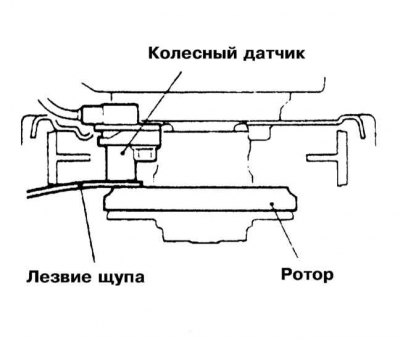
4. Using a non-magnetic blade-type feeler gauge, adjust the gap between the sensor and its rotor - the required value is 0.3-0.9 mm.
5. Tighten the fasteners completely and check the gap again to make sure it is set correctly. Repeat the adjustment if necessary.
6. Connect the negative cable to the battery.
Galant Models
Front wheel speed sensors
Removal
1. Wheel sensor installation details on Galant models are shown in the illustrations.
2. Disconnect the negative cable from the battery.
Warning! If the car stereo system is equipped with a security code, make sure you have the correct combination to activate the audio system before disconnecting the battery! To avoid triggering the airbags, wait at least 90 seconds after disconnecting the battery before removing the sensor.
3. Jack up the car and place it on stands. Remove the corresponding front wheel.
4. Remove the wheel arch protection liner.
5. Disconnect the electrical wiring from the wheel sensor.
6. Unscrew the tie bolts and remove the clamps securing the sensor wiring harness.
7. Loosen the mounting bolt and remove the wheel sensor.
Installation
1. Install the sensor in its standard place and tighten the mounting bolt.
Note. The gap between the sensor and its rotor is not adjustable, but must be checked. The required value is 28.2÷28.4 mm. If the change result is outside the permissible range, replace the sensor or rotor.
2. Secure the sensor wiring harness with cable ties - tighten the tie bolts securely.
3. Connect the wiring to the sensor.
4. Install the wheel arch protection liner.
5. Replace the wheel and lower the vehicle to the ground.
6. Connect the negative cable to the battery.
Rear wheel speed sensors
Removal
1. The installation details of the wheel sensors are shown in the illustrations.
2. Disconnect the negative cable from the battery.
Warning! If the car stereo system is equipped with a security code, make sure you have the correct combination to activate the audio system before disconnecting the battery! To avoid triggering the airbags, wait at least 90 seconds after disconnecting the battery before removing the sensor.
3. Jack up the car and place it on stands. Remove the corresponding front wheel.
4. Disconnect the electrical wiring from the wheel sensor.
5. Unscrew the tie bolts and remove the clamps securing the sensor wiring harness.
6. Loosen the mounting bolt and remove the wheel sensor.
Installation
1. Install the sensor in its standard place and tighten the mounting bolt.
Note. The gap between the sensor and its rotor is not adjustable, but must be checked. The required value is 28.2÷28.4 mm. If the change result is outside the permissible range, replace the sensor or rotor.
2. Secure the sensor wiring harness with cable ties - tighten the tie bolts securely.
3. Connect the wiring to the sensor.
4. Replace the wheel and lower the vehicle to the ground.
5. Connect the negative cable to the battery.
Diamante Models
Front wheel speed sensors
Removal
1. Front wheel speed sensor installation details on Diamante models are shown in the illustration.
2. Disconnect the negative cable from the battery.
Warning! If the car stereo system is equipped with a security code, make sure you have the correct combination to activate the audio system before disconnecting the battery! To avoid triggering the airbags, wait at least 90 seconds after disconnecting the battery before removing the sensor.
3. Jack up the car and place it on supports. Remove the corresponding wheel.
4. Remove the wheel arch protection liner.
5. Disconnect the electrical wiring from the wheel sensor.
6. Remove the sensor wiring harness fastening clips.
7. Remove the wheel sensor.
Installation
1. Install the sensor in its standard place and tighten it to the required torque (12 Nm).
2. Install the wiring harness retaining clips.
3. Connect the wiring to the sensor.
4. Connect the negative cable to the battery.
Rear wheel speed sensors
Removal
1. The installation details of the rear wheel speed sensors on Mirage models are shown in the illustration.
2. Disconnect the negative cable from the battery.
Warning! If the car stereo system is equipped with a security code, make sure you have the correct combination to activate the audio system before disconnecting the battery! To avoid triggering the airbags, wait at least 90 seconds after disconnecting the battery before removing the sensor.
3. Jack up the car and place it on supports. Remove the corresponding wheel.
4. Disconnect the electrical wiring from the wheel sensor.
5. Remove the sensor wiring harness fastening clips.
6. On all-wheel drive (AWD) models, remove the cable tie.
7. Unscrew the mounting bolt and remove the wheel sensor together with the sealing ring.
Installation
1. Install the sensor in its standard place (do not forget to replace the sealing ring) and tighten it to the required torque (12 Nm).
2. Install the wiring harness retaining clips.
3. Install the cable tie.
4. Connect the wiring to the sensor.
5. Connect the negative cable to the battery.