English Русский
Български
Беларускі
Український
Српски
Hrvatski
Română
Polski
Slovenský
Magyar
Articles Bookmark Contacts Sitemap   
Company Audi Company Ford Company Hyundai Company Kia Company Mazda Company Mercedes-Benz Company Nissan
MitsubishiMan.ru


Home Colt Lancer Galant L200 Outlander Pajero Others
Pajero 4 (2006-2021) Pajero 1 and 2 (1982-1999)

License plate mounting (Mitsubishi Pajero 4)

  • Home
  • Pajero
  • 4 (2006-2021)
  • Body and interior
  • Exterior (external elements)
  • License plate mounting
0
Contents: Removal the license plate mount ⤓ Installing a license plate mount ⤓

Removal the license plate mount


1. Remove the license plate mounting trim.

2. Remove the lower trim of the luggage compartment door.

3. Remove the water-repellent film from the luggage compartment door.

4. Remove the rear windshield washer reservoir.
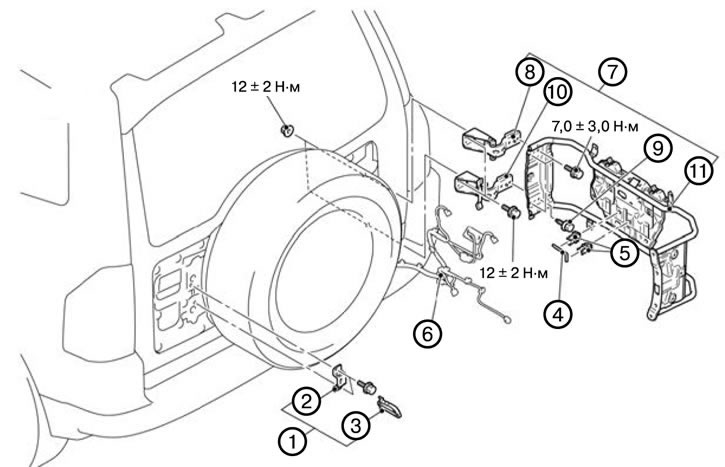


5. Remove the license plate holder assembly (1).

6. Remove the luggage compartment lid bracket (2).

7. Remove the license plate holder (3).

8. Remove the license plate retaining pin (4).

9. Remove the license plate retaining pin holder (5).

10. Disconnect the electrical wiring connector (6).

11. Remove the license plate mount assembly (7).

12. Remove the upper license plate mount canopy (8).

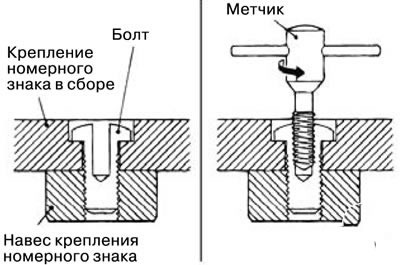
13. Unscrew the bolt (9).

1) Drill a shallow hole using a drill.

2) Cut the bolt using a left-hand tap.


14. Remove the lower canopy of the license plate holder (10).


15. Remove the license plate holder (11).

Installing a license plate mount


Note: When installing, tighten the bolts to the tightening torques shown in the figure.


The original article is on the website mitsubishiman.ru

1. Install the license plate holder (11).

2. Install the lower hinge of the license plate holder (10).

3. Tighten the bolt (9).

4. Install the upper license plate mount (8).

5. Install the license plate mount assembly (7).

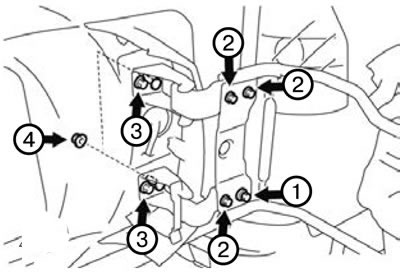
1) Temporarily tighten the shear bolt, mounting bolt and mounting nut in the order of 1, 2, 3, 4, and then tighten them in the order of 4, 3, 2 to the recommended tightening torque.

Tightening torque:
  • Mounting bolt 2:7.0±3.0 Nm.
  • Mounting bolt, nut 3.4:12±2 Nm.

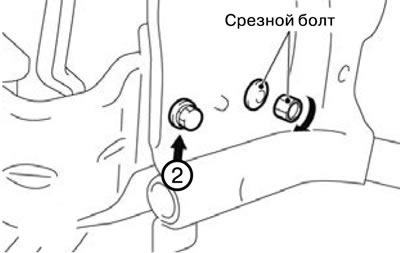
2) Tighten the shear bolt until its head is sheared off.


6. Connect the electrical wiring connector (6).


7. Install the license plate retaining pin holder (5).

8. Install the license plate retaining pin (4).

9. Install the license plate holder (3).

10. Install the luggage compartment lid bracket (2).

11. Install the license plate holder assembly (1).

12. Install the rear windshield washer reservoir.

13. Install the water-repellent film on the luggage compartment door.

14. Install the lower trim of the luggage compartment door.

15. Install the license plate mount trim.
This article is available at: russian, bulgarian, belarusian, ukrainian, serbian, croatian, romanian, polish, slovak, hungarian
This article was reviewed by: Miroslav Rakov
Share with friends:
◀ Previous
Pajero 4: Exterior (external elements)
Next ▶

Front wing
Installing the hood
Removal the hood
Adjusting the hood
General information — special tools
Front bumper
Rear bumper
Radiator grille
Mudguards — removal and installation
Moldings — removal and installation
Similar materials for other Mitsubishi models

➤ Side lights and license plate lights (hatchback, without… Mitsubishi Colt 5 (1995-2003, petrol)
➤ Current circuit of tail lights, parking lights and license… Mitsubishi Lancer 3 and 5 (1984-1992)
➤ Typical wiring diagram for rear lights, parking lights and… Mitsubishi Galant 5 (1983-1989, petrol)
➤ Cabin and cargo compartment mounting diagram Mitsubishi L200 4 (2005-2014, diesel)
➤ Removal and installation license plate light bulbs Mitsubishi Outlander 1 (2003-2008)
➤ Schemes 14, 15. Rear lights and license plate lighting Mitsubishi Carisma (1995-2004)
Link in different formats to this article
Comments and feedback from visitors
No comments yet


Add up two numbers 42 + 18


Pajero 4 (2006-2021) 
  • General information
  • User manual
  • Troubleshooting
  • Maintenance
  • Technical specifications
  • Power unit
  • Engine repair
  • Cooling system
  • Lubrication system
  • Fuel system
  • Engine management system
  • Intake and exhaust system
  • Engine electrical equipment
  • Transmission
  • Clutch
  • Manual gearbox
  • Automatic gearbox
  • Drive shafts
  • Chassis and running gear
  • Front suspension
  • Rear suspension
  • Brake system
  • Steering
  • Body and interior
  • Exterior (external elements)
  • Interior (internal elements)
  • Doors, locks and windows
  • Body dimensions
  • Electrical equipment
  • Safety system (SRS)
  • Air conditioner
  • Equipment and devices
  • Electrical diagrams
Pajero 1 and 2 (1982-1999) 
  • General information
  • User manual
  • Seats and seat belts
  • Instruments and controls
  • Driving and operation
  • Maintenance
  • Power unit
  • Gasoline engines
  • Diesel engines
  • Ignition system
  • Engine electrical equipment
  • Cooling and lubrication system
  • Power and exhaust system
  • Fuel system (gasoline)
  • Fuel system (diesel)
  • Transmission
  • Clutch
  • Mechanical gearbox
  • Automatic gearbox
  • Drive shafts and axles
  • Chassis and running gear
  • Front suspension
  • Rear suspension
  • Steering
  • Brake system
  • Body and interior
  • Exterior (external elements)
  • Interior (internal elements)
  • Doors, locks and windows
  • Electrical equipment
  • Equipment and devices
  • Heater and air conditioner
  • Cruise control
  • Headlights and lighting
  • Electrical circuits
MitsubishiMan.ru © 2018–2026 • Mobile version • Articles about Mitsubishi • Contacts • Sitemap: EN BG BY UA RS HR RO PL SK HU • Site search • Bookmark
Colt 2 and 3 (1983-1993) · Colt 4 and 5 (1991-2003) · Colt 5 (1995-2003) · Lancer 3 and 5 (1984-1992) · Lancer 9 (2000-2007) · Galant 5 (1983-1989) · Galant 6 and 7 (1987-1998) · L200 4 (2005-2014) · Outlander 1 (2003-2008) · Pajero 1 and 2 (1982-1999) · Pajero 4 (2006-2021) · Carisma (1995-2004) · Space Star (1998-2005) ·
This resource sets cookies 🍪 to avoid bothering you with repeated data entry.