Contents: General information ⤓ Table. MMCS system memory states…⤓ Features of system diagnostics ⤓ Features of diagnostics of the MMCS…⤓ Working in service mode ⤓ Reading and clearing diagnostic…⤓ Table. MMCS system error codes. ⤓ Removal and installation of MMCS…⤓ Removal and installation the…⤓ Removal and installation DIN cable ⤓ Checking the voltage at the…⤓ Table: Checking the voltage at the…⤓ Table for checking the voltage at…⤓ Table for checking voltage at the…⤓ Table for checking voltage at the…⤓
General information
1. The MMCS system combines the navigation system, audio system, air conditioning system, trip computer, TV tuner, self-diagnostic system, and reference system into a comprehensive vehicle information system.
Please note: the navigation system and TV tuner do not work in the Russian Federation.
2. Information is displayed using a high-contrast multifunctional display located on the central trim of the instrument panel; information is entered using special buttons (see the figure "MMCS control buttons" for the location of the buttons).
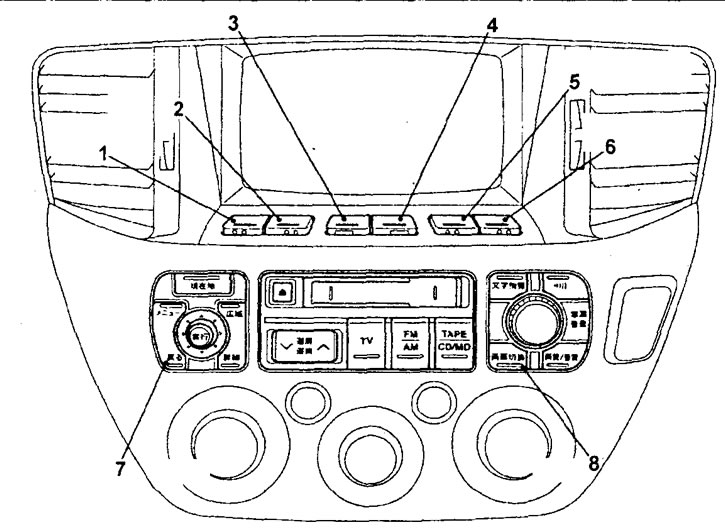
MMCS system control buttons. 1 - button #1 for additional functions, 2 - button #2 for additional functions, 3 - button #3 for additional functions, 4 - button #4 for additional functions, 5 - button #5 for additional functions, 6 - button #6 for additional functions, 7 - button to return the display to the previous state, 8 - button to switch display modes.
3. Functions of the MMCS service mode.
Note: To use service functions, you must enter the service mode.
a) Self-diagnosis function that checks for signals between all system units and checks the data bus for errors.
b) DVD or CD test function, which checks the operation of the DVD or CD drive.
Note: If it is not possible to read data from the CD or if the CD is not inserted, a corresponding message appears on the screen.
c) A diagnostic function that checks for the presence of signals between all system units.
d) LCD health check function, which checks the LCD for dead pixels.
d) Audio system test function, which performs a sequential test of the audio system speakers.
e) A function of the navigation system in which each sensor of the navigation system is tested,
g) Vehicle check function, which displays the current status of the vehicle.
c) Navigation system software check function, which displays the version of the loaded software and all units connected to the navigation system unit,
i) A diagnostic result function that displays the corresponding malfunction code indicating the sensor or control unit when the ignition switch is in the "ACC" position.
k) Data bus test function, which displays data bus errors and fault codes.
l) Data bus error memory function, which stores the history of data bus errors.
4. Before troubleshooting, it is recommended that you review the table of system states when disconnecting the battery.
Table. MMCS system memory states after disconnecting wires from battery terminals.
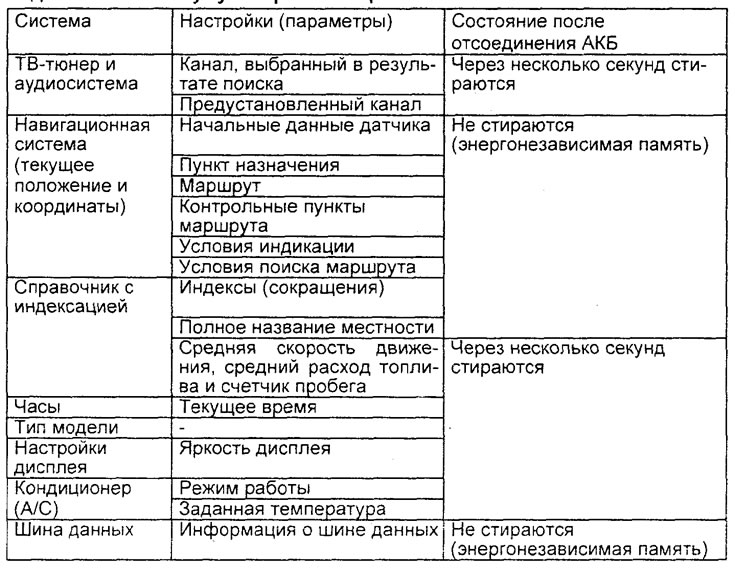
Attention: on models with MMCS, a large amount of data is stored in the memory of the control units of various systems, which will be erased after disconnecting the power supply (battery). Therefore, it is recommended to remember the settings of the most important systems and read the fault codes before disconnecting the wire from the negative terminal of the battery.
Features of system diagnostics
1. Malfunction of the MMCS may be caused by malfunctions that disrupt the interaction between the various control units. Therefore, it is necessary to check the service functions and self-diagnosis functions.
2. If a fault code appears for any system, first check that the wiring harness connector is connected correctly to the connector itself.
3. If the fault is not corrected, the fault is probably in the wiring harness or control unit. Check the wiring harness, and if it is not correct, replace the control unit assembly. Before replacing the unit, write down the fault code.
Features of diagnostics of the MMCS system interface
1. If there is a sign of a malfunction of the MMCS interface, it is necessary to check the service function (MMCS display), the operation of special buttons and the operation of the screen.
2. If a fault code appears for the MMCS system, first check that the wiring harness connector is connected correctly and the connector itself.
3. If the fault is not corrected, the fault is probably in the wiring harness or the corresponding unit. Check the wiring harness, and if it is not normal, replace the unit as a whole.
Working in service mode
1. To enter service mode:
- a) Turn the ignition key to the "OFF" position.
- b) While holding down button #6 of additional functions and the button for switching the MMCS display modes, turn on the ignition. Keep the buttons pressed for 5 seconds, after turning on the ignition and the first menu of the service mode will appear on the display.
Note:
- If the first menu of the service mode does not appear, you must perform all operations from the beginning.
- To enter a specific function of the service mode, press buttons No.1 - No.4 of additional functions.
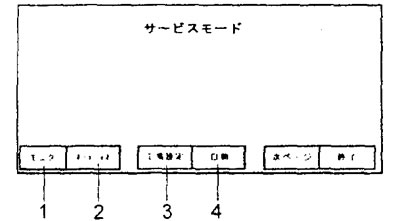
The first menu of the service mode. 1 - LCD display status check function, 2 - self-diagnosis check function, 3 - system settings, 4 - diagnostic function.
2. After the system has entered the first menu of the service mode, to enter the second menu of the service mode, press button No.5 of additional functions.
Note: to return to the first menu of the service mode, also press button No.5 of additional functions.
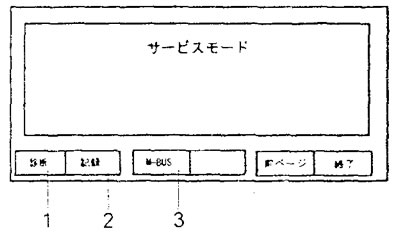
The second menu of the service mode.1 - self-diagnosis function, 2 - diagnostic results function, 3 - data bus error memory function.
3. To exit the service mode, press button No.6 of additional functions or turn the ignition key to the "OFF" position.
Reading and clearing diagnostic trouble codes
1. To enter the diagnostic results function menu in the second menu of the service mode, press button No.2 of additional functions.
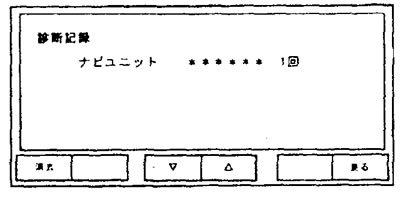
Diagnostic results function menu.
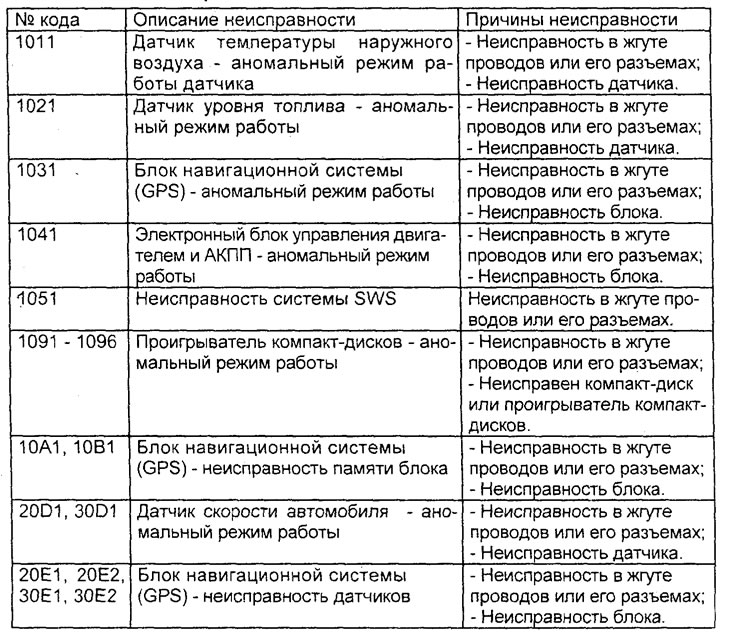
2. Determine the location of the malfunction based on the received diagnostic codes in accordance with the "MMCS System Malfunction Code Table", eliminate the malfunction, then repeat the checking procedure.
Table. MMCS system error codes.
3. To delete the displayed fault codes in the diagnostic results function menu, press button No.1 of additional functions. A confirmation request to delete the codes will appear on the display. To delete the codes, press button No.5 of additional functions, and to return to the diagnostic results function menu without deleting the fault codes, press button No.6 of additional functions.
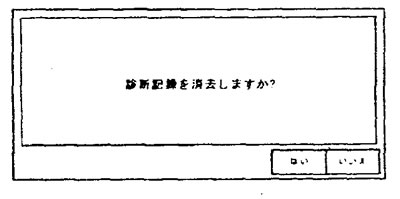
Request to confirm deletion of fault code.
4. To exit the diagnostic results function menu, press button No.6 of the additional functions.
Removal and installation of MMCS system components
− The parts are removed in the order of the numbers indicated in the figure "Removing MMCS system components".
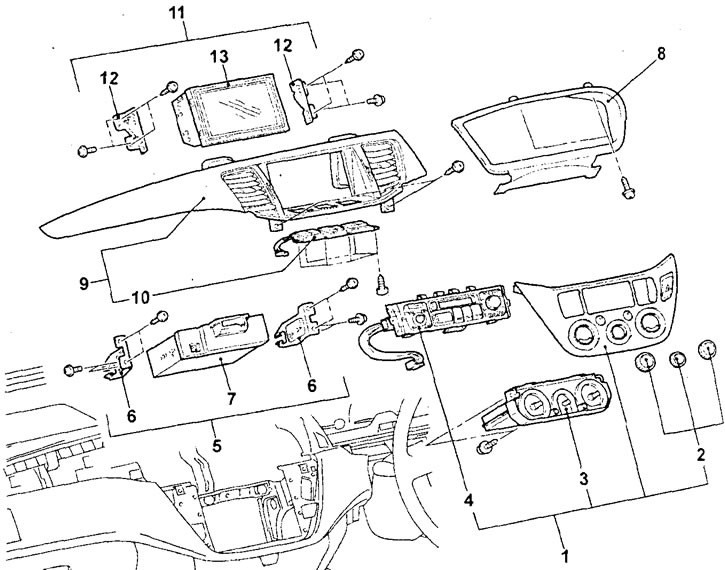
Removal MMCS components. 1 - heater and air conditioner control panel assembly, 2 - air conditioner control switch knobs assembly, 3 - heater and air conditioner control panel (air conditioner electronic control unit), 4 - MMCS control panel, 5 - audio system unit assembly, 6 - audio system unit mounting bracket, 7 - audio system unit, 8 - instrument cluster trim, 9 - instrument panel center trim, 10 - MMCS additional function button panel, 11 - multifunction display assembly, 12 - multifunction display mounting bracket, 13 - multifunction display.
− Installation of parts is carried out in the reverse order of removal.
Removal and installation the navigation system unit (GPS)
Attention: this system does not work in the Russian Federation.
− The parts are removed in the order of the numbers indicated in the figure "Removing the navigation system unit".
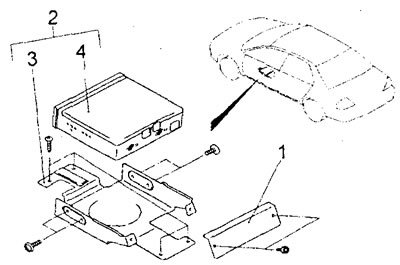
Removal the navigation system unit (sedan). 1 - side mounting bracket for the navigation system unit, 2 - assembled navigation system unit, 3 - lower mounting bracket for the navigation system unit, 4 - navigation system unit.
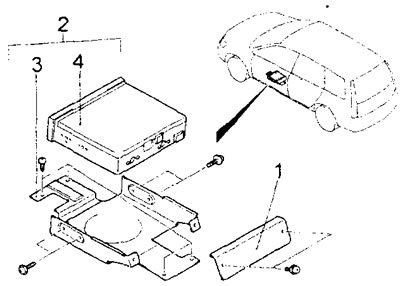
Removal the navigation system unit (station wagon). 1 - side mounting bracket for the navigation system unit, 2 - assembled navigation system unit, 3 - lower mounting bracket for the navigation system unit, 4 - navigation system unit.
− Installation of parts is carried out in the reverse order of removal.
Removal and installation DIN cable
1. Remove the lower part of the instrument panel center trim.
2. Remove the CD changer.
3. Remove the audio system unit.
4. Remove the navigation system unit.
5. Remove the instrument panel and center console.
6. Remove the front seat assembly.
7. Remove the floor mat.
8. Remove the DIN cable.
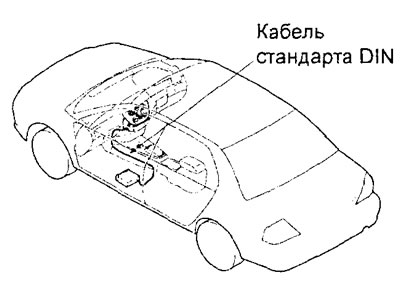
Sedan models
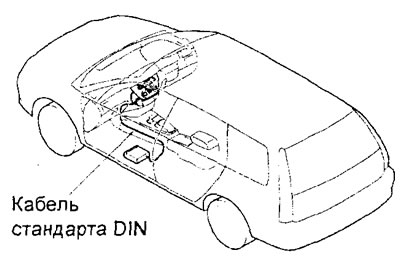
Station wagon models
Checking the voltage at the terminals of the MMCS system unit connectors
1. Measure the voltage between the vehicle ground terminal and each corresponding terminal of the MMCS unit.
2. The location of the terminals is shown in the corresponding figures.
3. The nominal voltage value for each tested terminal is indicated in the corresponding table.
4. The nominal values of the terminal voltages are indicated in the tables for checking the voltage at the terminals of the connectors of the corresponding MMCS system units.
Note to the table: "Open circuit" means an open circuit, "Short circuit" means a short circuit, "33" means the ignition switch, "AKB" voltage means the on-board network voltage.
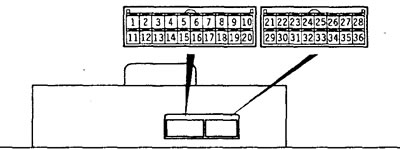
Multifunction display connectors
Table: Checking the voltage at the terminals of the multifunction display connector.

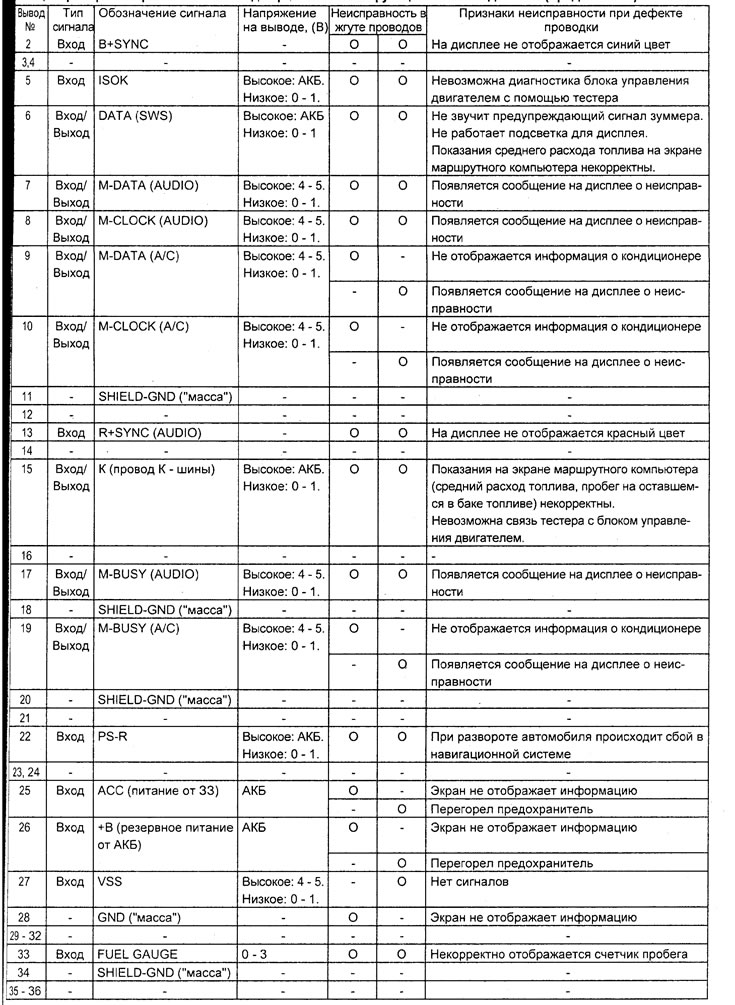
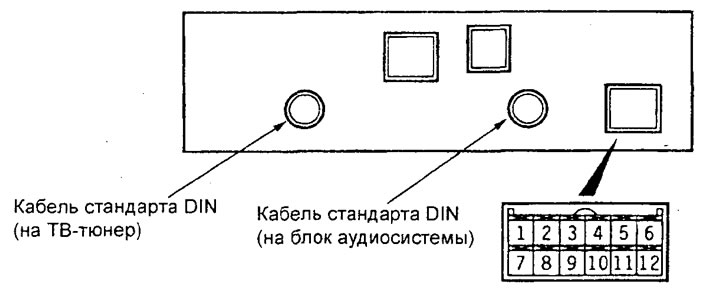
Navigation system unit connectors.
Table for checking the voltage at the terminals of the navigation system unit.
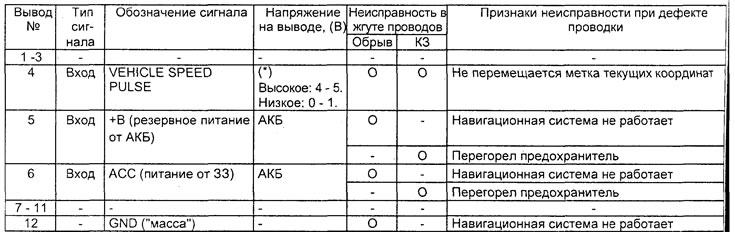
Note: (*) - when the wheels rotate, the voltage will change.
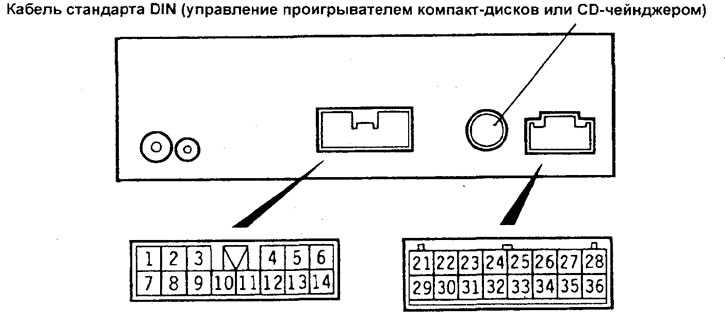
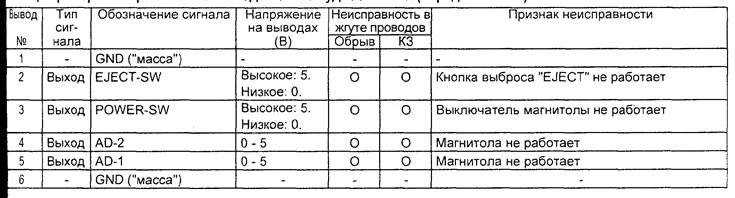
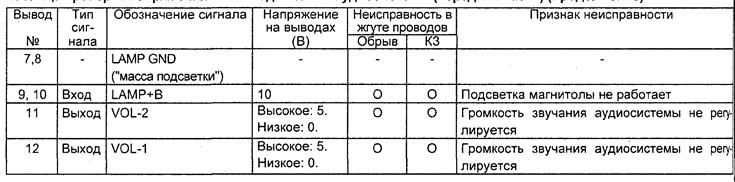
Audio unit connectors (rear part).
Table for checking voltage at the terminals of the audio system unit (rear part).
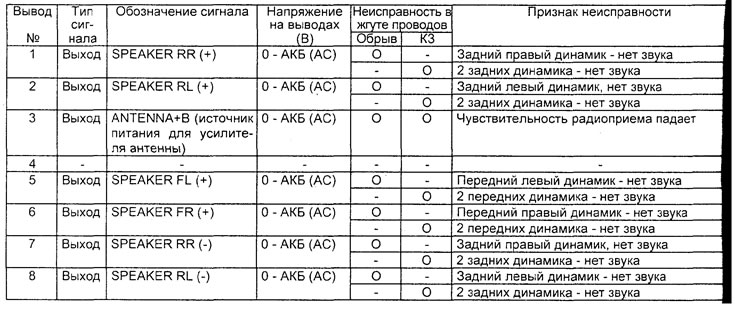
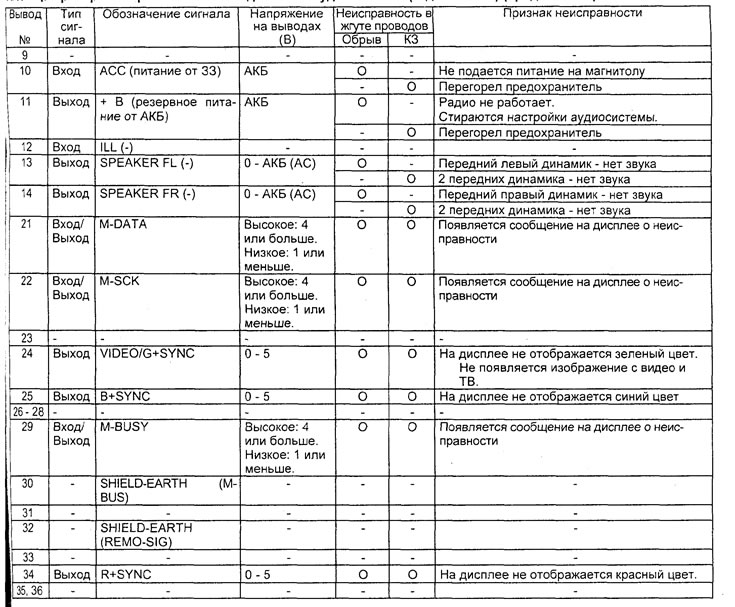
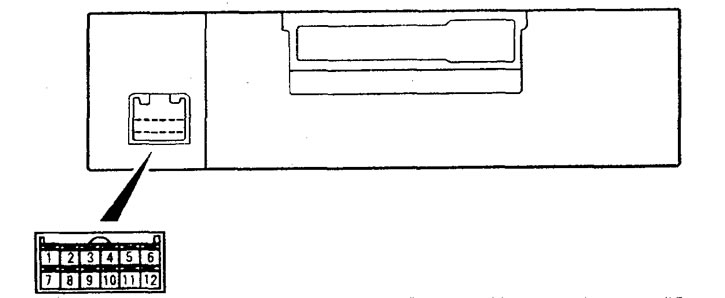
Audio unit connector (front part).
Table for checking voltage at the terminals of the audio system unit (front part).