



Removal
To remove, follow these steps.
1. Remove the rheostat.
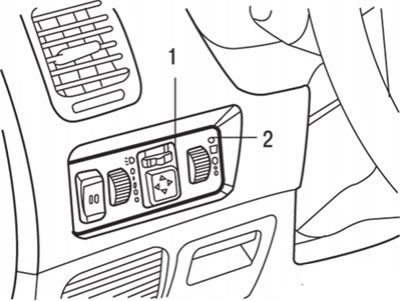
Fig. 19.44. Removing the rheostat: 1 – Switch cover; 2 – rheostat
2. To remove the rheostat, use a screwdriver blade as a lever to remove the rheostat cover, then disconnect the electrical connector and remove the rheostat from the cover (Fig. 19.44).
Examination
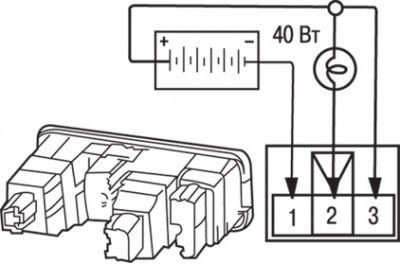
Fig. 19.45. Checking the instrument panel backlight rheostat
Connect the battery to the rheostat terminals through a test lamp (40 W) as shown in Fig. 19.45.
If, when turning the rheostat handle slowly, the brightness of the lighting changes smoothly and without switching off, then the rheostat is working normally.
Installation
Installation is carried out in the reverse order of removal.
(Original material on the website: MitsubishiMan)