



Contents: Selecting the operating mode of…⤓ Switching the headlight operating…⤓ Direction indicators ⤓
Selecting the operating mode of external lighting devices
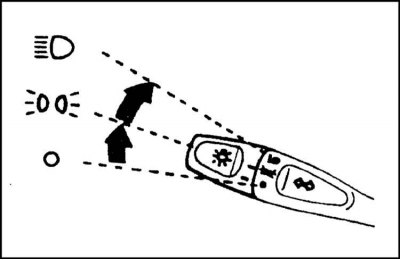
1. The operating mode of the external lighting devices (side lights, low beam) is selected using the rotary handle located at the end of the steering column switch lever. It is possible to select one of three external lighting modes:
O off
 — side lights - front and rear side lights, license plate lights are turned on
 — low beam - in addition to the lights activated in the previous position of the handle, the low beam of the headlights is turned on
2. On models equipped with daytime running lights (DRL), the headlights are automatically switched to low beam mode when the ignition is turned on. The rear side lights are also automatically activated.
3. Most models are equipped with a warning buzzer to warn the driver that the lights need to be switched off before leaving the vehicle. The buzzer sounds when attempting to open the driver's door with the ignition off (key in the LOCK or ACC position) if the exterior lighting mode selector handle is not set to the "Off" O position.
Attention! Remember that excessively long operation of the external lighting with the engine off may result in the battery being discharged!
Switching the headlight operating modes (low/high beam)
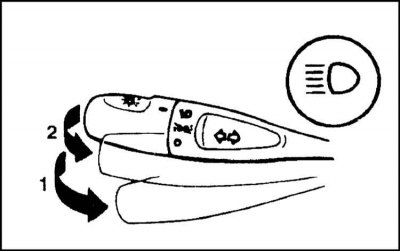
Turning on high beam and headlight signaling
1 - Turn on high beam
2 - Headlight signaling
1. Switching the headlights from low beam to high beam mode is done by moving the steering column switch lever to position (1) - the corresponding indicator lamp of a characteristic blue light should automatically light up on the instrument panel (see above).
2. It is also possible to signal with high beams: signaling is carried out by lightly pressing the lever of the steering column switch in the direction of switching on the high beams (position (2)) and regardless of the selected position of the handle for selecting the operating mode of the external lighting devices (see above).
Direction indicators
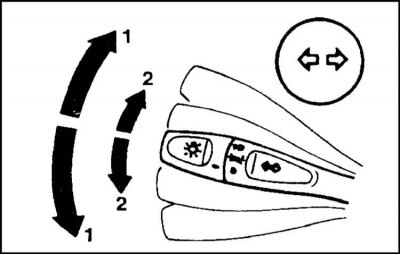
Activating the direction indicators
1 — Switching on the indicators in continuous mode (until the limit switch is triggered or the lever is moved to the middle position)
2 - Brief activation of indicators (until the lever is released)
1. The direction indicators are activated by pressing the left steering column stalk lever in the appropriate direction. The lever is moved up or down, depending on the selected direction of course change.
2. When the lever is moved to the extreme upper/lower position (until it clicks), the corresponding turn signals will continue to function until the steering wheel is returned to the straight-ahead position (the limit switch is activated) or until the lever is returned to the neutral position.
3. Brief activation of the indicators, for example, when intending to change lanes, is done by lightly pulling the lever up or down.