
English Русский
Български
Беларускі
Український
Српски
Hrvatski
Română
Polski
Slovenský
Magyar
Articles Bookmark Contacts Sitemap   
Company Audi Company Ford Company Hyundai Company Kia Company Mazda Company Mercedes-Benz Company Nissan
MitsubishiMan.ru


Home Colt Lancer Galant L200 Outlander Pajero Others
Carisma (1995-2004) Space Star (1998-2005)

Lighting, headlight and turn signal switch (Mitsubishi Carisma)

  • Home
  • Mitsubishi
  • Carisma (1995-2004)
  • General information
  • User manual
  • Lighting, headlight and turn signal switch
0
Contents: Headlights ⤓ Headlamp/Exterior Light Switch-Off…⤓ Switching headlights (low/high beam) ⤓ Flashing headlights ⤓ Turn signal switch ⤓

Headlights
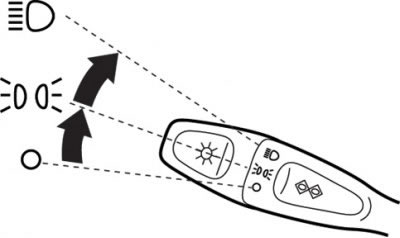


Fig. 1.17. Positions of the rotary light switch


Turn the switch to turn on the exterior lights/headlights (Fig. 1.17).

All headlights/exterior lighting are off.

The side lights, rear license plate lights and instrument cluster lighting are on.

The headlights and other external lighting devices are turned on.


Headlamp/Exterior Light Switch-Off Control System


If the driver's side door is opened with the ignition key in the LOCK or ACC position, or with the key removed from the ignition switch and the headlight switch in the or , then a buzzer (sound signal) is activated, reminding the driver to turn off the headlights and exterior lighting. After they are turned off, the buzzer stops sounding.

Switching headlights (low/high beam)


If the headlight switch is in the position , then each time the lever is moved toward the steering wheel, the light switches from high to low beam (or from low to high beam). If the high beam is on, the high beam indicator lamp also lights up.

Flashing headlights


When the switch lever is moved slightly toward the steering wheel, the headlights will flash and go out after the lever is released. If the high beam is on, the high beam indicator lamp will also light.


Note: The headlight flashing mode can also be activated when the headlights/exterior lights are off.


Turn signal switch


When the combination switch is moved (with the ignition switch in the "ON" position), the corresponding turn signal lights start to flash. At the same time, the turn signal indicator light in the instrument cluster flashes.

(The material was borrowed from the website mitsubishiman.ru)

1. Standard operating mode of the turn signal switch.
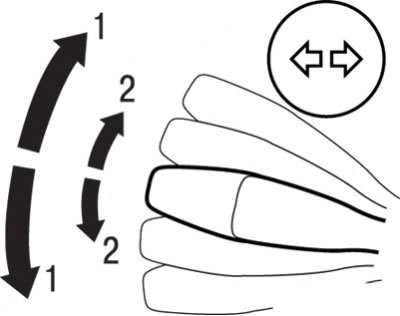


Fig. 1.18. Switch positions during normal rotation (1) and when changing rows (2)


When performing a normal turn, move the lever to position 1 (Fig. 1.18). At the end of the turn, the lever will automatically return to its original position.

Sometimes after turning the car, the lever does not return to its original position. This happens when turning the steering wheel at a small angle. In this case, return the lever to its original position by hand.

2. Switch operating mode when changing rows.

When changing lanes, move the lever to position 2 (see Fig. 1.18). After releasing, the lever returns to the neutral position.
This article is available at: russian, bulgarian, belarusian, ukrainian, serbian, croatian, romanian, polish, slovak, hungarian
This article was reviewed by: Dmitry Vasiliev
Share with friends:
◀ Previous
Carisma: User manual
Next ▶

Control and measuring instruments and controls
Front seat adjustment
Lift and slide roof hatch
Electric windows
Vehicle locking and unlocking control locations
Headlight corrector switch
Windshield wiper and washer switch
Rear Window Wiper and Washer Switch (Hatchback)
Headlamp Washer Switch
Precautions when using glass cleaners and washers
Similar materials for other Mitsubishi models

➤ Checking the turn signal switch Mitsubishi Colt 4 and 5 (1991-2003)
➤ Checking the turn signal switch Mitsubishi Lancer 3 and 5 (1984-1992)
➤ Left combination steering column switch (exterior lighting… Mitsubishi Galant 6 and 7 (1987-1998)
➤ Steering column turn signal switch Mitsubishi L200 4 (2005-2014, diesel)
➤ Turn signal switch Mitsubishi Outlander 1 (2003-2008)
➤ Switch block (headlights, turn signal, windshield wiper) Mitsubishi Pajero 1 and 2 (1982-1999)
Link in different formats to this article
Comments and feedback from visitors
No comments yet


Add up two numbers 25 + 17


Carisma (1995-2004) 
  • General information
  • User manual
  • Maintenance
  • Power unit
  • Petrol engines 4G9
  • Diesel engines FBQT
  • Diesel engines F9Q
  • Cooling system
  • Injection system (MPI)
  • Injection system (GDI)
  • Engine electrical equipment
  • Transmission
  • Clutch
  • Mechanical gearbox
  • Automatic gearbox
  • Chassis and running gear
  • Steering
  • Brake system
  • Front suspension and shafts
  • Rear suspension
  • Body and interior
  • Exterior (external elements)
  • Interior (internal elements)
  • Doors, locks and windows
  • Air conditioner
  • Electrical equipment
  • Equipment and devices
  • Headlights and lighting
  • Electrical circuits
Space Star (1998-2005) 
  • General information
  • User manual
  • Maintenance
  • Power unit
  • Petrol engines 4G9
  • Petrol engines 4G1
  • Diesel engines F9Q1
  • Cooling system
  • Fuel injection system GDI
  • Fuel injection system MPI
  • Diesel supply system F9Q1
  • Ignition system
  • Diesel preheating
  • Transmission
  • Clutch
  • Mechanical gearbox
  • Automatic gearbox
  • Chassis and running gear
  • Suspension and drive shafts
  • Brake system
  • Steering
  • Body and interior
  • Exterior (external elements)
  • Interior (internal elements)
  • Doors, locks and windows
  • Heating and air conditioning
  • Electrical equipment
  • Power devices
  • Equipment and devices
MitsubishiMan.ru © 2018–2026 • Mobile version • Articles about Mitsubishi • Contacts • Sitemap: EN BG BY UA RS HR RO PL SK HU • Site search • Bookmark
Colt 2 and 3 (1983-1993) · Colt 4 and 5 (1991-2003) · Colt 5 (1995-2003) · Lancer 3 and 5 (1984-1992) · Lancer 9 (2000-2007) · Galant 5 (1983-1989) · Galant 6 and 7 (1987-1998) · L200 4 (2005-2014) · Outlander 1 (2003-2008) · Pajero 1 and 2 (1982-1999) · Pajero 4 (2006-2021) · Carisma (1995-2004) · Space Star (1998-2005) ·
This resource sets cookies 🍪 to avoid bothering you with repeated data entry.