



Contents: Radio tape recorder ⤓ Radio ⤓ Antenna ⤓ Compact Disc Player (Type 1 and Type…⤓ Mini Disc Player (Type 3) ⤓ CD changer or MD changer (type 2 or…⤓
Note: The location of the switches is shown in the "Radio" figure.
1. The quality of radio signal reception may vary significantly while the vehicle is moving due to terrain features, weather conditions and proximity to sources of electromagnetic radiation.
Note: the more distance from the transmitting antenna of the radio station the signal power decreases. For the FM range the zone of confident reception is within 20-25 km in the "Stereo" mode and 30-40 km in the "Mono" mode.
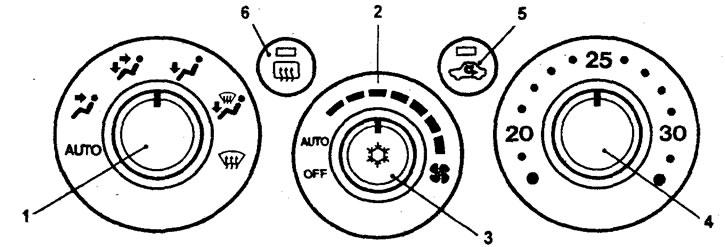
Control panel for heating and air conditioning with automatic control (type 1).
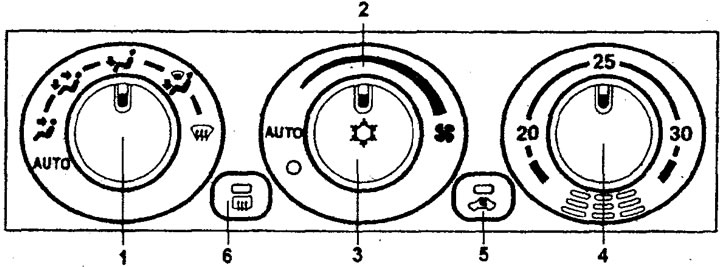
Control panel for heating and air conditioning with automatic control (type 1).
Note: For a description of the switches, see the "Automatic Heater and Air Conditioner Control Panel" subsection.
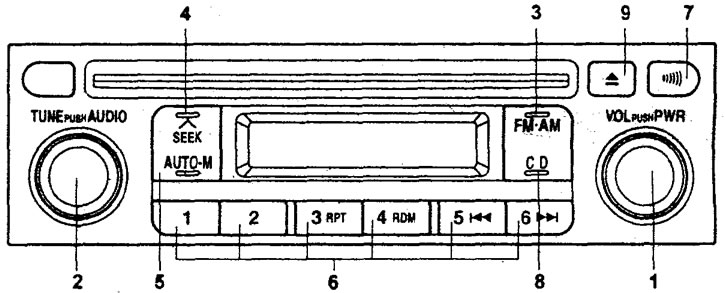
Radio. Type 1
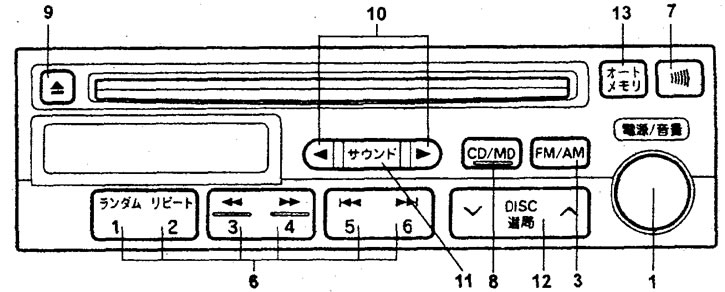
Radio. Type 2
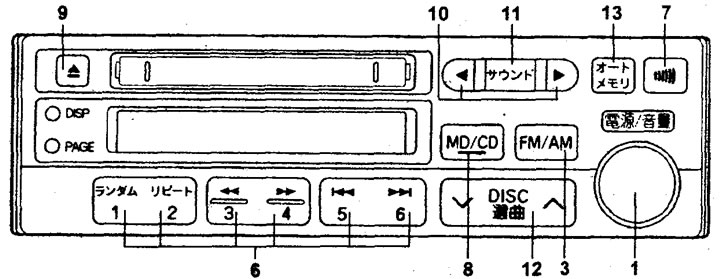
Radio. Type 3
2. Audio cassette player.
a) Clean the tape drive mechanism of the radio with a cleaning cassette approximately once a month. This will ensure constant playback quality.
6) It is not recommended to use 120-minute cassettes, as the thin film can cause damage to the film or cause it to become wound around the tape drive mechanism.
c) Do not expose audio cassettes to high temperatures, such as by placing the cassette under the windshield. This may cause deformation of the cassette body.
3. CD player.
a) In cold weather or high humidity, due to fogging of the disc surface and optical elements of the player, playback failures are possible. After the humidity returns to normal, the audio system will resume operation.
b) Strong vibration may cause distortion and interruptions in CD playback. This is not a malfunction.
c) It is not recommended to leave discs in the open sun. Protect the disc surface from scratches.
Radio tape recorder
Turning on and off
The audio system is switched on by pressing the (1) "PWR" button (the system that was working before the last switch-off will be switched on).
Volume control
Turn the control (1) to the right to increase the volume and to the left to decrease it.
Note: If the battery is disconnected for a long time, the radio memory is erased and factory settings are restored.
Tone and balance control (type 1)
Adjustment is carried out by turning the switch (2). Switching between adjustment parameters is carried out by pressing the switch (2) "AUDIO".
BASS(low frequency timbre),
TREB(high frequency timbre).
FADE(balance between front and rear speakers).
BAL(balance between right and left speakers).
Tone and balance adjustment (type 2 and type 3)
The tone and balance are adjusted using the buttons (10) (◄ or ►). Switching between adjustment parameters is done using the button (11) "MODE". The display shows the parameter name, average value and set value.
BASS(low frequency timbre).
TREB(high frequency timbre).
FADE(balance between front and rear speakers).
BAL(balance between right and left speakers).
Note: If no operation is performed for approximately 7 seconds after pressing the [10] or [11] buttons, the tone and balance adjustment mode will turn off.
Radio
By pressing the button (3) (FM/AM) the radio is turned on, pressing it again switches the range (AM or FM).
Tuning radio stations
1. Button (4) "SEEK" (type 1).
Pressing the (4) "SEEK" button will turn on the automatic search for a radio station. The search will stop when a stable signal is found. If the signal is weak, if the automatic search does not fix the setting, press the tuning button again (the automatic search will turn off) and tune manually one step at a time using the (2) "TUNE" knob.
2. Button (12) "TUNE" (type 2 and type 3). Press the right or left side of the button (12) (v or л) until a beep is heard (automatic radio station search is activated). The search will stop when a stable signal is found. If automatic search does not fix the tuning due to a weak signal from the radio station, press the tuning button again (automatic search will be deactivated) and perform manual tuning one step at a time. During stereo reception, the "ST" indicator is displayed.
Note: for the AM range the tuning step is 9 kHz, for the FM range the tuning step is 0.1 MHz.
3. Button (5) "AUTO-M" (type 1).
Pressing the (5) "AUTO-M" button will activate the automatic search and memorization mode of radio stations.
Automatic radio station search mode allows automatic tuning of radio stations to the setting buttons (6) from "1" to "6" if a stable signal is found. During stereo reception, the "ST" indicator is displayed.
4. Button (13) "AUTO-MEMO" (type 2 and type 3).
Button (13) "AUTO-MEMO" is designed for automatic programming of settings:
- a) Select the range, then press the (13) "AUTO-MEMO" button until you hear a beep. The "A" symbol will appear on the display and automatic radio station search will be performed.
- b) The stations found (up to 8) will be sequentially entered into the radio memory. If no stations are found, a dotted line will appear on the display.
- c) Each short press of the button (13) will switch to the tuned radio station in the order they are remembered.
Programming settings
The settings of the most frequently listened to radio stations can be saved into memory. To do this, tune in to the desired radio station, then press and hold one of the buttons (6) until a beep is heard. Switching to the tuned radio station is done by briefly pressing the desired button.
Note: if the batteries are absent for a long time, the radio memory is erased and factory settings are restored.
Information on the situation on the roads
This function is selected using button (7). This function does not work in the Russian Federation.
Note: New radios are set to 1620 kHz.
Antenna
Caution: Before washing your car or driving into a room with a low ceiling, make sure that this action will not damage the antenna.
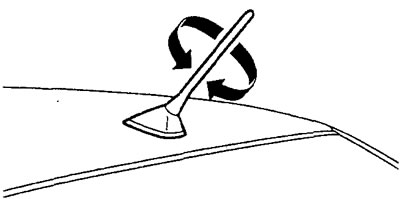
Whip antenna
The removable whip antenna is located on the roof of the vehicle.
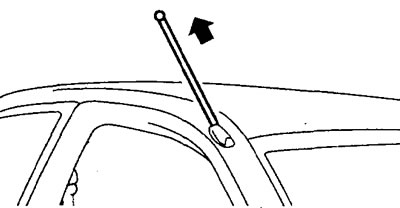
Retractable antenna
This antenna is manually operated by grasping the top end of the antenna and pulling it upward until resistance is felt.
Compact Disc Player (Type 1 and Type 2)
Switching to the CD player mode is done by pressing button (8).
Loading the CD
Insert the CD into the loading slot and push it gently.
Ejecting a CD
To eject the CD, press the button (9).
Selecting a Recording
To select a record (track), press the button "5" (6) or "6" (6) (lower number - "|◄◄", higher number - "►►|") until the display shows the number of the required record with the "TRACK" indicator.
Selecting a Recording Fragment (Type 2)
This function is designed to go to any fragment of the recording located before or after the current playback location. To do this, press the button "3" (6) or "4" (6) ("◄◄" or "►►"). Rewinding will stop when you release the button (when going back, take into account the current playback location).
Repeat recording
To play the current recording repeatedly, press the "3" (6) (type 1) or "2" (6) (type 2) "RPT" button. The display will show "RPT". To turn off repeat, press the button again.
Random selection of records
To play the CD tracks in random order, press the "4" (6) (type 1) or "1" (6) (type 2) "RDM" button. The display will show "RDM". To continue playing the track, press the "RDM" button again.
Select disk (type 2 or type 3)
The selection of disks is carried out using the button (12) (v or l).
Error messages
The following messages may appear on the radio display:
| Code | Malfunction |
| E01 E02 | Error reading data (CD defect) |
| E0Z E | Defective CD playback mechanism |
| E HOT | Playback stopped due to player overheating. |
| No DISC | No CD inserted |
Mini Disc Player (Type 3)
Switching to the mini-disc player mode is done by pressing the (8) "MD/CD" button.
Removal MiniDisks
Mini-discs are removed using button (9).
Loading MiniDiscs
Insert the mini disc into the slot and push it forward slightly.
Selecting a Recording
To select a record (track), press the button "5" (6) or "6" (6) (lower number - "|◄◄", higher number - "►►|") until the display shows the number of the required record with the "TRACK" indicator.
Selecting a recording fragment
This function is designed to go to any fragment of the recording located before or after the current playback location. To do this, press the button "3" (6) or "4" (6) ("◄◄" or "►►"). Rewinding will stop when you release the button (when going back, take into account the current playback location).
Repeat recording
To play the current recording repeatedly, press button "2" (6) "RPT". The display will show "RPT". To turn off the repeat, press the button again.
Random selection of records
To play the MD tracks in random order, press the "1" (6) "RDM" button. The display will show "RDM". To continue playing the track, press the "RDM" button again.
CD changer or MD changer (type 2 or type 3)
CO - changer (type 3)
Switching to the CD player mode is done by double pressing the (8) "MD/CD" button.
MD - changer (type 2)
Switching to the mini-disc player mode is done by double-pressing the "CD/MD" button (8).
Note:
- - The CD changer or MD changer can only be used when the radio is turned on.
- - Volume, tone and balance are adjusted using the radio.
- - After removing the disc from the CD changer or MD changer, the radio will turn on.
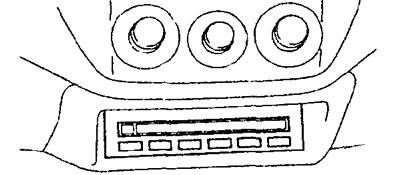
1. The CD or minidisc player is turned on when a disc is inserted into the player. Note: Disc playback will stop when the "EJECT" disc eject button on the CD player is pressed.
2. The CD changer or MD changer is designed for six discs. To insert or remove a disc, follow these steps:
a) Press one of the six disk selection buttons. After that, the indicator above the pressed button will light up.
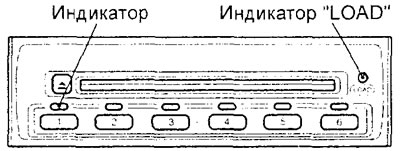
Indicator "LOAD"
CD changer.
b) If the "LOAD" indicator does not light up, then the disc is already installed. To remove it, press the "EJECT" button on the CD changer. After removing the disc, you can install a new one, label side up.
b) If the "LOAD" indicator lights up, then the disk can be installed.
Note: The operation of a CD changer or MD changer is exactly the same as that of a compact disc player.