



Contents: Control Panel ⤓ Changing the fan speed ⤓ Temperature change ⤓ Change of operating mode ⤓ Selection of incoming air ⤓
Control Panel
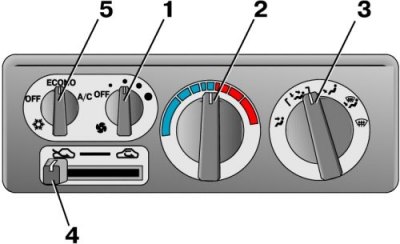
1. Fan switch
2. Temperature control knob
3. Mode switch knob
4. Incoming air switch lever
5. Air conditioner switch (if installed)
Changing the fan speed
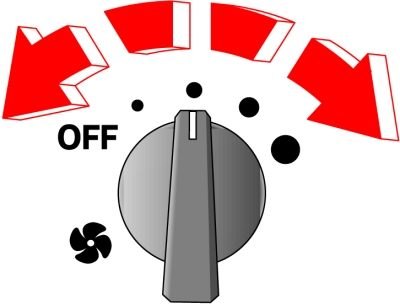
The fan can operate at different speeds (when the ignition key is turned to the ON position). Select the desired speed using the control knob. When the knob is turned to the OFF position, the heater and air conditioner do not work.
The original material is posted on the website (mitsubishiman.ru)
Temperature change
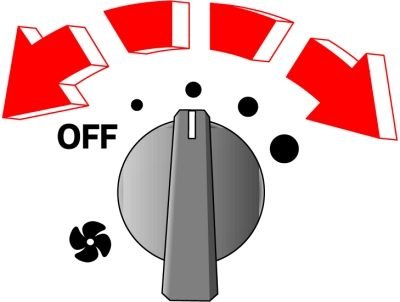
Select the desired temperature by turning the knob left or right.
Turning the knob to the right makes the incoming air warmer.
Caution: When the engine coolant temperature is low, the intake air temperature changes even if you turn the adjustment knob all the way to the right.
Change of operating mode
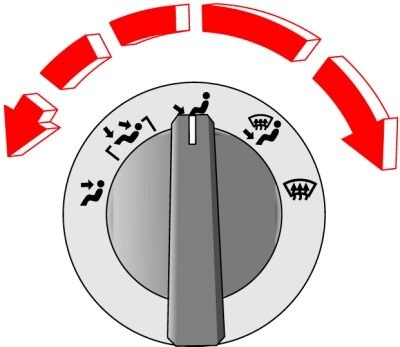
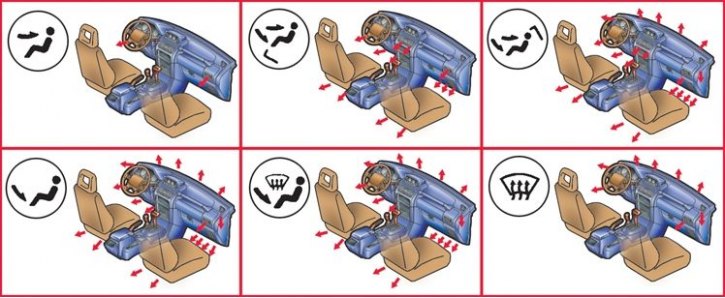
To change the direction from which air enters the cabin, turn the control knob.
 (Air enters at face level). Air enters only the upper part of the car's interior.
 (Air enters from below and at face level). Air enters mainly into the upper part of the cabin and, partially, into the lower part.
 (Air enters from below and at face level). Air enters mainly into the lower part of the cabin and, partially, into the upper part.
 (Air comes down). Air enters only the lower part of the car's interior.
 (Air flows down and onto the glass). Air is supplied to the lower part of the passenger compartment, to the windshield and to the door windows.
 (Air enters the glass). Air is supplied only to the windshield and door windows.
Selection of incoming air
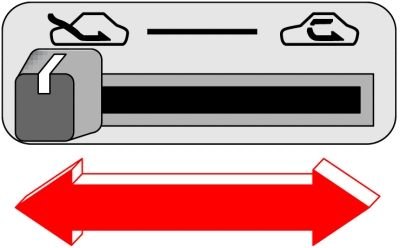
When operating the heating and air conditioning system, you can choose which air to use – from the passenger compartment or from outside the car. This adjustment is made using the incoming air selection lever.
 Under normal conditions, the lever should be in this position to allow air from outside the vehicle to enter the vehicle's interior. Use this mode to reduce condensation on glass and when smoking.
 Air from the car's interior is used. Set the lever to this position when driving on a dusty road or if you want to quickly raise/lower the temperature in the cabin.
Attention! Set the lever to the position