
English Русский
Български
Беларускі
Український
Српски
Hrvatski
Română
Polski
Slovenský
Magyar
Articles Bookmark Contacts Sitemap   
Company Audi Company Ford Company Hyundai Company Kia Company Mazda Company Mercedes-Benz Company Nissan
MitsubishiMan.ru


Home Colt Lancer Galant L200 Outlander Pajero Others
Carisma (1995-2004) Space Star (1998-2005)

Instrument cluster — removal and installation (Mitsubishi Carisma)

  • Home
  • Mitsubishi
  • Carisma (1995-2004)
  • Electrical equipment
  • Equipment and devices
  • Instrument cluster — removal and installation
0

Removal


To remove the instrument cluster, perform the following steps.
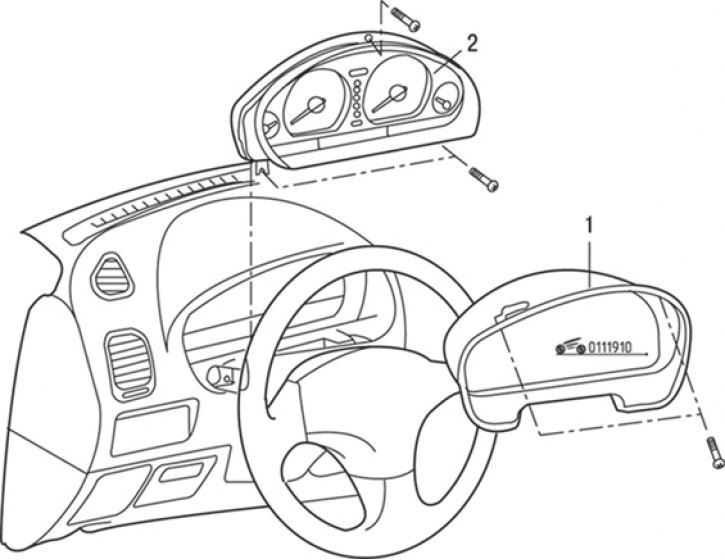


Fig. 19.10. Instrument cluster: 1 – instrument cluster visor; 2 – instrument cluster


1. Loosen the screws and remove the instrument cluster visor 1 (Fig. 19.10).

2. Loosen the screws, move the instrument cluster forward, disconnect the electrical connectors and speedometer drive cable, and remove the instrument cluster.
This article is available at: russian, bulgarian, belarusian, ukrainian, serbian, croatian, romanian, polish, slovak, hungarian
This article was reviewed by: Dmitry Vasiliev
Share with friends:
◀ Previous
Carisma: Equipment and devices
Next ▶

Checking the coolant temperature sensor
Checking the fuel level sensor
Identification Code (ID) Registration Method
Ignition switch and immobilizer
Battery — care and charging
Checking the fuel gauge
Checking the coolant temperature gauge
Radio — removal and installation
Speakers — Removal and Installation
Antenna — removal, inspection and installation
Similar materials for other Mitsubishi models

➤ Instrument cluster — removal and installation Mitsubishi Colt 2 and 3 (1983-1993)
➤ Instrument cluster indicators Mitsubishi Lancer 9 (2000-2007, petrol)
➤ Instrument cluster backlight brightness control Mitsubishi Galant 6 and 7 (1987-1998)
➤ Instrument cluster Mitsubishi L200 4 (2005-2014, diesel)
➤ Instrument cluster backlight adjustment rheostat Mitsubishi Outlander 1 (2003-2008)
➤ Instrument cluster and gauges Mitsubishi Pajero 1 and 2 (1982-1999)
Link in different formats to this article
Comments and feedback from visitors
No comments yet


Add up two numbers 13 + 50


Carisma (1995-2004) 
  • General information
  • User manual
  • Maintenance
  • Power unit
  • Petrol engines 4G9
  • Diesel engines FBQT
  • Diesel engines F9Q
  • Cooling system
  • Injection system (MPI)
  • Injection system (GDI)
  • Engine electrical equipment
  • Transmission
  • Clutch
  • Mechanical gearbox
  • Automatic gearbox
  • Chassis and running gear
  • Steering
  • Brake system
  • Front suspension and shafts
  • Rear suspension
  • Body and interior
  • Exterior (external elements)
  • Interior (internal elements)
  • Doors, locks and windows
  • Air conditioner
  • Electrical equipment
  • Equipment and devices
  • Headlights and lighting
  • Electrical circuits
Space Star (1998-2005) 
  • General information
  • User manual
  • Maintenance
  • Power unit
  • Petrol engines 4G9
  • Petrol engines 4G1
  • Diesel engines F9Q1
  • Cooling system
  • Fuel injection system GDI
  • Fuel injection system MPI
  • Diesel supply system F9Q1
  • Ignition system
  • Diesel preheating
  • Transmission
  • Clutch
  • Mechanical gearbox
  • Automatic gearbox
  • Chassis and running gear
  • Suspension and drive shafts
  • Brake system
  • Steering
  • Body and interior
  • Exterior (external elements)
  • Interior (internal elements)
  • Doors, locks and windows
  • Heating and air conditioning
  • Electrical equipment
  • Power devices
  • Equipment and devices
MitsubishiMan.ru © 2018–2026 • Mobile version • Articles about Mitsubishi • Contacts • Sitemap: EN BG BY UA RS HR RO PL SK HU • Site search • Bookmark
Colt 2 and 3 (1983-1993) · Colt 4 and 5 (1991-2003) · Colt 5 (1995-2003) · Lancer 3 and 5 (1984-1992) · Lancer 9 (2000-2007) · Galant 5 (1983-1989) · Galant 6 and 7 (1987-1998) · L200 4 (2005-2014) · Outlander 1 (2003-2008) · Pajero 1 and 2 (1982-1999) · Pajero 4 (2006-2021) · Carisma (1995-2004) · Space Star (1998-2005) ·
This resource sets cookies 🍪 to avoid bothering you with repeated data entry.