
English Русский
Български
Беларускі
Український
Српски
Hrvatski
Română
Polski
Slovenský
Magyar
Articles Bookmark Contacts Sitemap   
Company Audi Company Ford Company Hyundai Company Kia Company Mazda Company Mercedes-Benz Company Nissan
MitsubishiMan.ru


Home Colt Lancer Galant L200 Outlander Pajero Others
Carisma (1995-2004) Space Star (1998-2005)

Radio — removal and installation (Mitsubishi Carisma)

  • Home
  • Mitsubishi
  • Carisma (1995-2004)
  • Electrical equipment
  • Equipment and devices
  • Radio — removal and installation
0
Contents: Removal ⤓ Installation ⤓

Removal


To remove, follow these steps.

1. Remove the center console panel.

2. Unscrew the screws and remove the radio with brackets. Disconnect the electrical connectors from the radio.
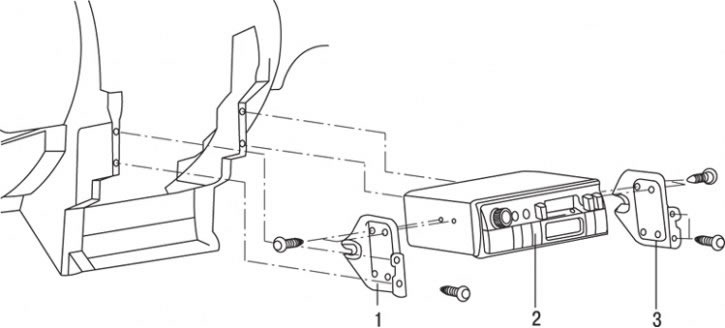


Fig. 19.46. Removing the radio: 1 – left bracket for mounting the radio; 2 – radio; 3 – right bracket for mounting the radio


3. Loosen the screws and remove the left bracket 1 (Fig. 19.46).

4. Loosen the screws and remove the right bracket 3 for mounting the radio.

Installation


Installation is carried out in the reverse order of removal.

[The original material is here: www.mitsubishiman.ru]
This article is available at: russian, bulgarian, belarusian, ukrainian, serbian, croatian, romanian, polish, slovak, hungarian
This article was reviewed by: Dmitry Vasiliev
Share with friends:
◀ Previous
Carisma: Equipment and devices
Next ▶

Checking the coolant temperature gauge
Checking the fuel gauge
Instrument cluster — removal and installation
Checking the coolant temperature sensor
Checking the fuel level sensor
Speakers — Removal and Installation
Antenna — removal, inspection and installation
Fuses — Description and Location
Replacing the fuse
Similar materials for other Mitsubishi models

➤ Removal and installation speakers/radio Mitsubishi Lancer 3 and 5 (1984-1992)
➤ Audio system — radio, tape recorder, CD player Mitsubishi Galant 6 and 7 (1987-1998)
➤ Audio system (radio and CD player) Mitsubishi L200 4 (2005-2014, diesel)
➤ Radio and CD player Mitsubishi Pajero 1 and 2 (1982-1999)
Link in different formats to this article
Comments and feedback from visitors
No comments yet


Add up two numbers 46 + 35


Carisma (1995-2004) 
  • General information
  • User manual
  • Maintenance
  • Power unit
  • Petrol engines 4G9
  • Diesel engines FBQT
  • Diesel engines F9Q
  • Cooling system
  • Injection system (MPI)
  • Injection system (GDI)
  • Engine electrical equipment
  • Transmission
  • Clutch
  • Mechanical gearbox
  • Automatic gearbox
  • Chassis and running gear
  • Steering
  • Brake system
  • Front suspension and shafts
  • Rear suspension
  • Body and interior
  • Exterior (external elements)
  • Interior (internal elements)
  • Doors, locks and windows
  • Air conditioner
  • Electrical equipment
  • Equipment and devices
  • Headlights and lighting
  • Electrical circuits
Space Star (1998-2005) 
  • General information
  • User manual
  • Maintenance
  • Power unit
  • Petrol engines 4G9
  • Petrol engines 4G1
  • Diesel engines F9Q1
  • Cooling system
  • Fuel injection system GDI
  • Fuel injection system MPI
  • Diesel supply system F9Q1
  • Ignition system
  • Diesel preheating
  • Transmission
  • Clutch
  • Mechanical gearbox
  • Automatic gearbox
  • Chassis and running gear
  • Suspension and drive shafts
  • Brake system
  • Steering
  • Body and interior
  • Exterior (external elements)
  • Interior (internal elements)
  • Doors, locks and windows
  • Heating and air conditioning
  • Electrical equipment
  • Power devices
  • Equipment and devices
MitsubishiMan.ru © 2018–2026 • Mobile version • Articles about Mitsubishi • Contacts • Sitemap: EN BG BY UA RS HR RO PL SK HU • Site search • Bookmark
Colt 2 and 3 (1983-1993) · Colt 4 and 5 (1991-2003) · Colt 5 (1995-2003) · Lancer 3 and 5 (1984-1992) · Lancer 9 (2000-2007) · Galant 5 (1983-1989) · Galant 6 and 7 (1987-1998) · L200 4 (2005-2014) · Outlander 1 (2003-2008) · Pajero 1 and 2 (1982-1999) · Pajero 4 (2006-2021) · Carisma (1995-2004) · Space Star (1998-2005) ·
This resource sets cookies 🍪 to avoid bothering you with repeated data entry.