



Contents: Headlights ⤓ Headlight reminder system ⤓ Headlight switch ⤓ Briefly switching on headlights for…⤓ Turn signal switch ⤓ 1. Direction indicators ⤓ 2. Row change signals ⤓
 |  |
Headlights
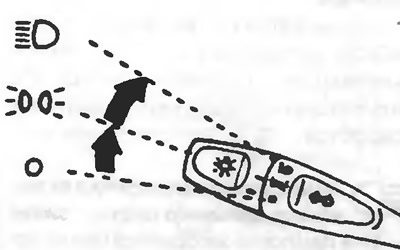
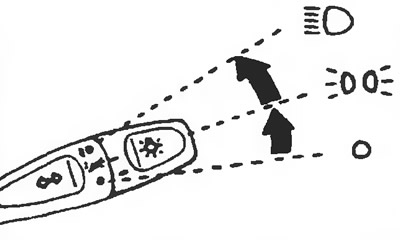
To turn on the lighting, set this switch to the following positions:
 The lights are off
 The side lights, tail lights, number plate light and instrument cluster light are on
 Headlights are on
Headlight reminder system
When the driver's door is opened with the key in the ignition switch in the "LOCK" or "ACC" position, when the key is removed from the ignition switch and the headlight switch is in the "ON" position
or a buzzer sounds, reminding the driver to turn off the lights. To do this, turn the light switch to the off position.
Headlight switch
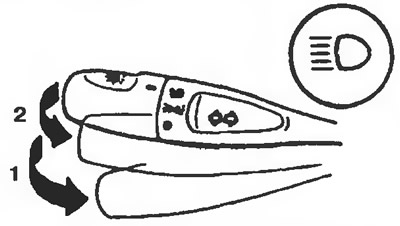 | 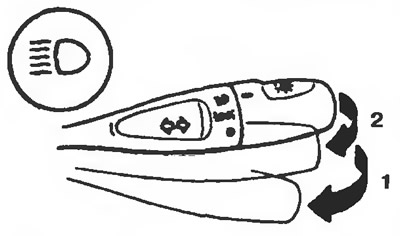 |
When the headlight switch is in the position
, each time the lever is pressed in direction 1, the headlights switch from low to high beam and from high to low beam. When the high beam is on, the high beam indicator light on the instrument panel lights up.
Briefly switching on headlights for light signaling
When the lever is pressed slightly in direction 2, the high beam headlights are switched on. When the lever is released, the light is switched off. And in this case, when the high beam headlights are switched on, the high beam indicator light on the instrument panel lights up.
Attention! Signaling with headlights is possible even when the light switch is in the "OFF" position.
Turn signal switch
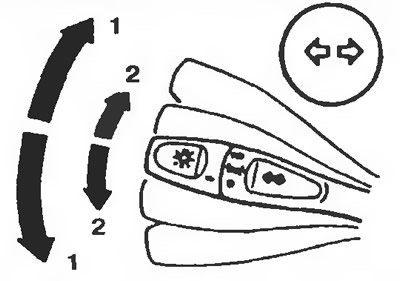 | 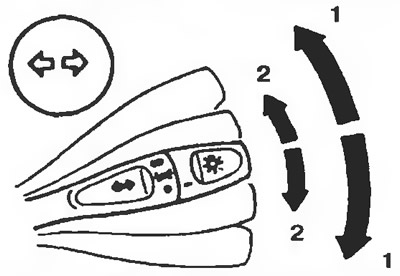 |
When this switch is moved (with the ignition key in the "ON" position), the corresponding turn signal lamps flash. At the same time, the turn signal indicator lamp on the instrument panel flashes.
1. Direction indicators
When performing a normal turn, move the lever to this position. After completing the turn, the lever will automatically return to its original position.
There are cases when the lever does not return to its original position after turning the car. This happens when turning the steering wheel at a small angle. In such cases, return the lever by hand.
2. Row change signals
When changing the line of motion, move the lever to this position. After releasing the lever, it will return to the neutral position.