



Contents: Using the MUT-II device ⤓ Without using the MUT-II device ⤓ Clearing fault codes using the…⤓ Clearing fault codes without using…⤓
Using the MUT-II device
Connect the MUT-II tool to the 16-pin diagnostic connector and check the diagnostic trouble codes (Fig. 15.70).
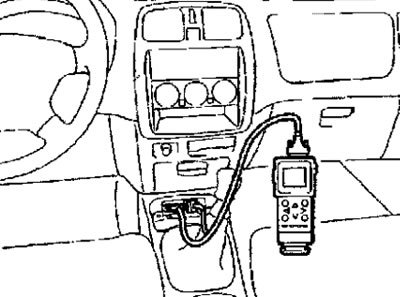
Fig. 15.70. Connecting the MUT-II device to the 16-pin diagnostic connector
Without using the MUT-II device
1. Using a special wire harness, connect contact No.1 of the diagnostic connector to ground (Fig. 15.71).
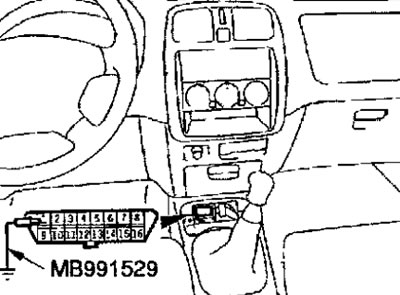
Fig. 15.71. Using a special wiring harness to connect to the ground of contact No.1 of the diagnostic connector
[The material was copied from the website: mitsubishiman]
2. Turn on the ignition and read the diagnostic trouble code based on the number of flashes of the ABS warning lamp (Fig. 15.72).
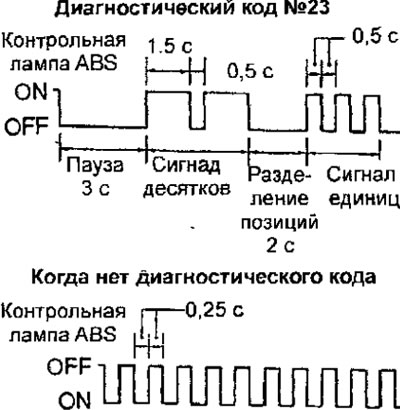
Fig. 15.72. ABS warning lamp flashing diagram when reading a diagnostic code
Clearing fault codes using the MUT-II tool
Connect the MUT-II to the 16-pin diagnostic connector and erase the diagnostic trouble codes (Fig. 15.70). Before connecting and disconnecting the MUT-II to the diagnostic connector, turn off the ignition.
Clearing fault codes without using the MUT-II device
Diagnostic trouble codes can be "erased" by pressing the brake light switch ten times within 10 seconds with the ABS on and the vehicle speed below 10 km/h.