



Contents: Operation of the air conditioning…⤓ Manual air conditioning control ⤓ Selecting a ventilation mode ⤓ Selecting the air intake mode ⤓ Selecting the fan operating mode ⤓ Eliminating fogging of the…⤓ Fast defogging (fast heating) of…⤓ Cooling ⤓ Turning off the air conditioner ⤓ Instructions for using the air…⤓ Recommendations for the care of the…⤓ In case of prolonged downtime in a…⤓
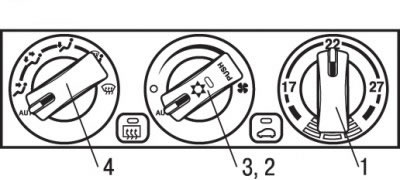
Fig. 1.50. Control panel of the air conditioner with automatic control: 1 – air temperature control handle; 2 – air conditioner switch (press); 3 – fan mode knob; 4 – ventilation mode selection handle
The air conditioner operates only when the engine is running. The control panel of the air conditioner with automatic control is shown in Fig. 1.50.
Caution! When the air conditioner is running, the idle speed increases slightly because the air conditioner compressor turns on and off automatically. If you have stopped the car, fully depress the brake pedal to prevent it from moving slowly; this precaution is especially important for vehicles with automatic transmission.
Operation of the air conditioning system in automatic mode
Under normal conditions, it is recommended to use the air conditioning system in automatic mode. To switch it to this mode, follow these steps.
1. Set the fan mode switch to the "AUT" ("Automatic") position.
2. Turn the air temperature control knob to the position corresponding to the desired temperature.
The temperature can be set between 15 and 29°C. To increase the temperature, turn the knob to the right.
Under normal conditions, it is recommended to set the temperature at around 22°C.
3. Set the ventilation mode selection knob to the "AUT" ("Automatic") position.
Selecting the direction of air flow from the deflectors, with the exception of
 и
и  the air intake mode (outdoor air intake or recirculation), fan speed and air conditioner on/off are carried out automatically in this mode.
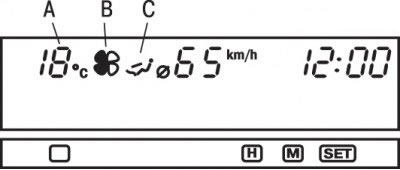
Fig. 1.51. Symbols displayed on the multifunctional display: A – outside air temperature/set temperature; B – fan speed; C – direction of air flows
If the vehicle is equipped with a multifunctional central display, it will display the readings shown in Fig. 1.51.
Note. 1. Readings A (see Fig. 1.51) usually refer to the air temperature outside the vehicle. The set temperature readings are displayed for a few seconds when the position of the air temperature control knob is changed.
Note: 2. If the outside temperature drops below 3°C, a warning signal will sound. The outside air temperature numeric values will flash for about 5 seconds. The temperature adjustment knob is inoperative during this time. Set the desired temperature after the warning signal ends.
Manual air conditioning control
If you set the fan speed selector knob or ventilation mode selector knob to any position you wish, the system will still automatically control all parameters except those set by turning the corresponding knob. To return to automatic control of all parameters, set the corresponding knobs to the "AUT" position.
Selecting a ventilation mode
Set the ventilation mode selection knob to any position you wish. When you turn this knob, the ventilation system nozzles change.
If the vehicle is equipped with a multifunctional central display, the ventilation mode will be displayed on it С (see Fig. 1.51).
The deflectors/nozzles of the ventilation system from which air is supplied depending on the selection of ventilation modes, and the symbol indication on the display are shown in Table 1.2.
Table 1.2. Ventilation system deflectors/nozzles from which air is supplied depending on the selection of ventilation modes, and the symbol indication on the display
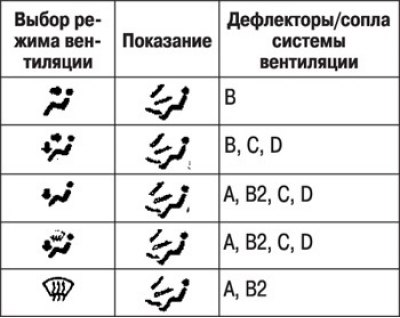
* Indicates weak air flow.
Designations:
- А - from the windshield and side window deflectors;
- В - from side deflectors and a central deflector;
- С - from under the dashboard;
- D - from under the front seats;
Main directions of air flows (ventilation modes)
 To the head area. The air flow enters the upper part of the car interior.
 To the foot/head area. Air is directed to the upper part of the car interior and to the foot area.
 To the leg area. Air enters the leg area only.
 To the foot area/to the windshield and side window heating deflectors. Air flows to the foot area, windshield and door windows.
 To the windshield and side window heating deflectors. Air is supplied only to the windshield and door windows of the vehicle.
Note: Air is always supplied from the central and side vents, regardless of the position of the ventilation mode selection knob.
Selecting the air intake mode
Each time you press the air intake mode switch, the ventilation mode changes between the outside air intake mode and the recirculation mode.
In recirculation mode, the indicator lamp lights up.
Outdoor air intake mode.
Outside air enters the car's interior.
Air recirculation mode.
Air recirculation occurs in the car's interior.
The outside air intake mode is typically used to quickly clear the windshield and side windows of moisture or ice and keep them clean.
The recirculation mode should be selected when intensive cooling of the interior air is required, as well as if the outside air is heavily dusty or polluted.
In this case, you should periodically turn on the outside air intake mode to avoid fogging of the windows.
Selecting the fan operating mode
By turning the knob 3 (see Fig. 1.50) of the fan mode switch clockwise or counterclockwise, you can set the desired air supply speed. The air supply speed increases smoothly when you turn the knob clockwise.
If the vehicle is equipped with a multi-function central display, the fan operation indicator is displayed on it В (see Fig. 1.51).
Eliminating fogging of the windshield and door windows
To remove frost or condensation (fogging) from the windshield or door windows, set the ventilation mode selection knob to the position
 or
or  (Fig. 1.52).
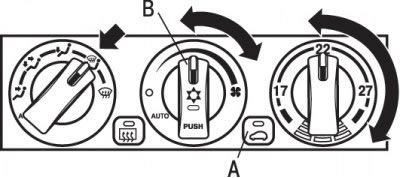
Fig. 1.52. Location of buttons (A) for selecting the ventilation mode, turning on the air conditioner (B) and the position of the handles for eliminating fogging of the windshield and door windows
 This position heats the footwell and removes fog from the windshield and door windows (recommended when driving in rain or snow).
1. Switch А (see Fig. 1.52) set the outside air intake mode.
2. Set the ventilation mode selection knob to the position

3. Adjust the fan speed.
4. Adjust the temperature as desired.
5. Press the switch В air conditioner.
Fast defogging (fast heating) of glass
To quickly remove fogging (quickly heat) the glass, follow these steps.
1. Set the ventilation mode selection knob to the position
 (Fig. 1.53).
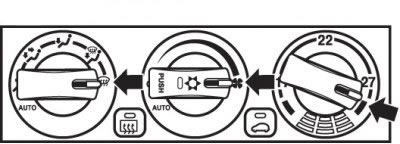
Fig. 1.53. Location of handles in the fast defogging (fast heating) mode
2. Set the fan speed to maximum.
3. Adjust the temperature by setting the air temperature control knob to maximum.
4. If the ventilation mode selection knob is in the position
 , then the air conditioner operates in automatic mode. The outside air intake mode will also be selected automatically.
5. To effectively remove fog from the windows, direct the air flow from the side deflectors towards the door windows.
Do not set the air temperature control knob to a position close to the maximum cooling position. When blowing cool air on the door glass, water vapor will condense on it (fogging).
Cooling
Set the ventilation mode selection knob to the position

Switch А (Fig. 1.54) set the outside air intake mode and press the switch В air conditioner.
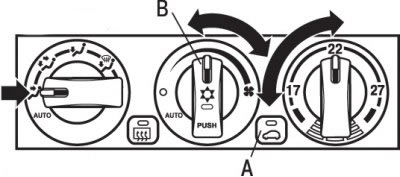
Fig. 1.54. Location of buttons (A) for selecting ventilation mode, turning on the air conditioner (B) and the position of the handles in cooling mode
1. Adjust the temperature by turning the air temperature control knob clockwise or counterclockwise.
2. Select the required fan speed.
3. If the outside air is dusty, too polluted, or if you need to quickly cool the air in the cabin, set the air intake mode selection switch to the recirculation position and turn the temperature control knob all the way to the left.
Turning off the air conditioner
To turn off the air conditioner, move the fan speed selector knob to the "O" ("Off") position. After this, only the air intake mode can be changed.
Instructions for using the air conditioner
Park your car in the shade. If you leave your car in the sun, it will heat up a lot and it will take longer to cool down the interior. If you can't avoid parking in the sun, open the windows for the first few minutes of air conditioning to let the hot air out of the interior.
When the air conditioner is running, the side windows must be raised. The flow of outside air through open windows reduces the efficiency of the air conditioner.
Too much cooling of the air is harmful to health. The air temperature in the cabin should be only 5-6°C lower than the outside air temperature.
When operating the system, make sure that the air intake openings located in front of the windshield are free of foreign objects, such as leaves. Leaves clogged in the air duct prevent normal air flow and block the water drainage openings.
Recommendations for the care of the air conditioning system
If the air conditioner's performance has decreased compared to the standard, the cause may be a refrigerant leak. Have the air conditioner checked by an authorized Mitsubishi dealer.
The air conditioner installed in the car must be filled with HFC-134a refrigerant and SUN-PAG56 air conditioner oil.
Using a different refrigerant or lubricant will cause serious damage, requiring replacement of the entire air conditioning system.
Do not release refrigerant into the atmosphere.
The new refrigerant HFC-134a used in cars does not harm the ozone layer of the atmosphere.
It is recommended to recover the refrigerant for further reuse.
In case of prolonged downtime in a non-operating state
The air conditioner should be turned on for at least 5 minutes every week, even in cold weather. This prevents deterioration of the lubrication of the internal parts of the compressor and ensures that the air conditioning system is maintained in good technical condition. If these requirements are not met, the system may emit an unusual odor. This does not indicate that it is faulty.