



Repair of the generator of the gasoline engine 4G9
Disassembly
- Secure the generator in a vice.
- Remove the four clamping bolts, insert the blade of two flat-head screwdrivers between the front cover and the stator magnetic circuit, press the screwdrivers and remove the cover (Fig. 19.9). Do not insert the screwdrivers too deeply, as this may damage the stator winding.
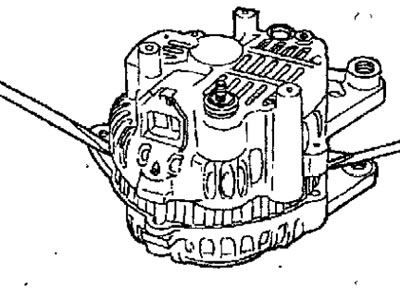
Fig. 19.9. Using two screwdrivers to remove the front cover of the generator
- Clamp the rotor in a vice from the pulley side, being careful not to damage the rotor.
- Loosen the pulley mounting nut and remove the spring washer and pulley (Fig. 19.10).
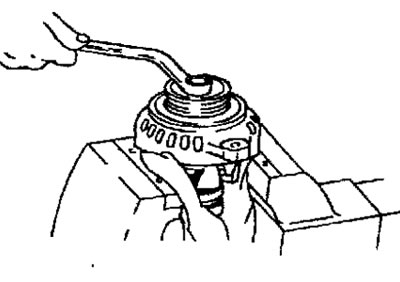
Fig. 19.10. Unscrewing the generator pulley mounting nut
- Remove the front cover and two washers.
- Remove the rotor from the vice.
- Remove the screws securing the brush holder, rectifier and terminal B securing nut.
- Remove the stator from the rear cover.
- Separate the oil deflector from the brush holder.
- Using a 180-250 W soldering iron, unsolder the wires from the diodes and remove the stator. When unsoldering, make sure that the heat from the soldering iron is not transferred to the rectifier diodes. Unsolder as quickly as possible, otherwise the rectifier diodes may be damaged.
- When separating the rectifier from the voltage regulator, unsolder the wires soldered to the rectifier (Fig. 19.11).
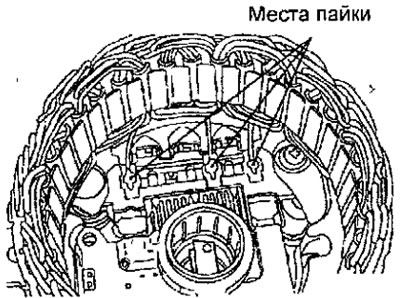
Fig. 19.11. Wire soldering points when removing the stator
Checking the rotor
- Use an ohmmeter to measure the resistance between the contact rings (Fig. 19.12). If the resistance does not match the required value, replace the rotor.
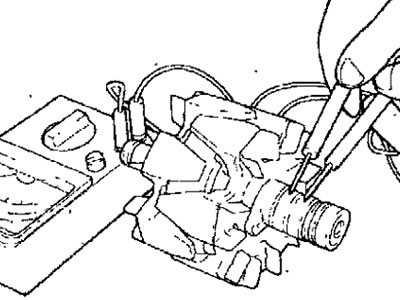
Fig. 19.12. Measuring the resistance between the rotor slip rings
Resistance: 2-5 Ohm
- Use an ohmmeter to check the conductivity between the slip ring and the rotor anchor (Fig. 19.13). If there is conductivity, replace the rotor.
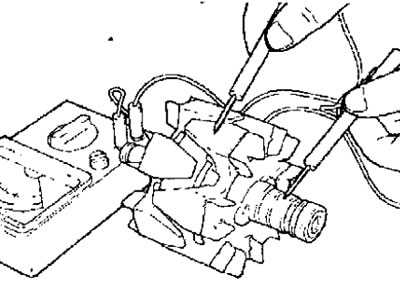
Fig. 19.13. Measuring the resistance between the slip ring and the rotor anchor
Stator check
- Use an ohmmeter to check the conductivity between the stator coil terminals (Fig. 19.14). If there is no conductivity, replace the stator.
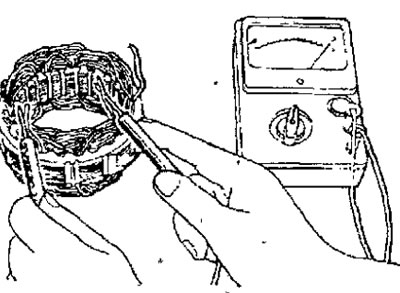
Fig. 19.14. Measuring the resistance between the terminals of the stator coil
- Use an ohmmeter to check the conductivity between each winding terminal and the stator core (Fig. 19.15). If there is conductivity, replace the stator.
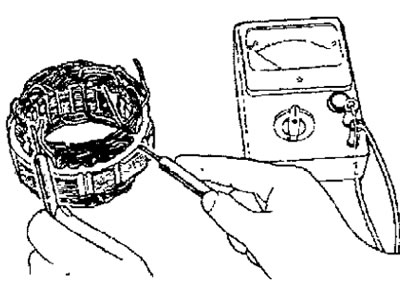
Fig. 19.15. Measuring the resistance between each winding terminal and the stator core
Checking the rectifier
- Make sure that the circuit is closed between the positive poles of the rectifier and the terminal of the stator coil (Fig. 19.16). The ohmmeter should show conductivity in one direction only. If there is conductivity in both directions, the diode is broken and the rectifier must be replaced.
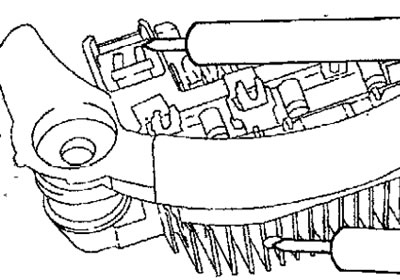
Fig. 19.16. Measuring the conductivity between the positive poles of the rectifier and the stator coil terminal clamp
- Make sure that the circuit between the negative terminals of the rectifier and the stator coil terminal clamp is open (Fig. 19.17). The ohmmeter should show continuity in one direction only. If there is continuity in both directions, the diode is broken and the rectifier must be replaced.
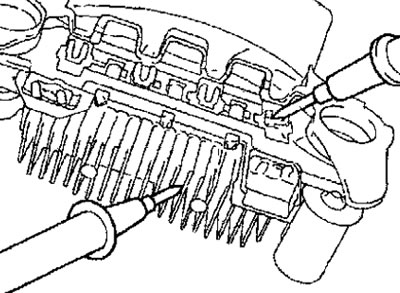
Fig. 19.17. Measuring the resistance between the negative poles of the rectifier and the stator coil terminal clamp
- Use an ohmmeter to check the conductivity between the terminals of each of the three diodes (Fig. 19.18). The ohmmeter should show conductivity in only one direction. If there is conductivity in both directions, then the diode is broken and the rectifier must be replaced.
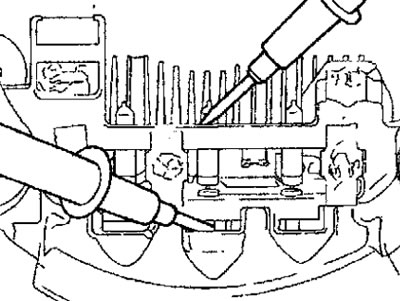
Fig. 19.18. Measuring the resistance between the terminals of each of the three diodes
Checking the brushes
- Measure the brush protrusion and replace the brush if the brush protrusion is less than 2 mm (Fig. 19.19).
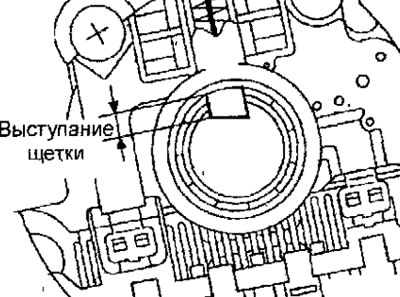
Fig. 19.19. Location for measuring brush protrusion
- Unsolder the braided wire and remove the spring and brush (Fig. 19.20).
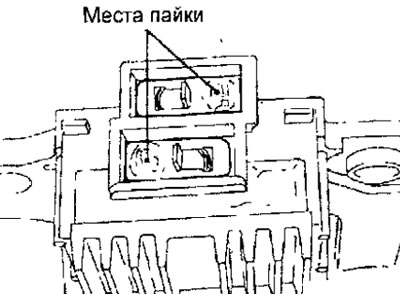
Fig. 19.20. Place of soldering of braided brush wires
- Install the brush spring and new brush into the brush holder.
- Insert the brush so that there is a distance of 2-3 mm between the wear limit line and the end of the brush holder.
- Solder the braided wire to the brush holder.
Assembly
- Assembly is carried out in the reverse order of disassembly, taking into account the following.
- After installing the voltage regulator, before attaching the rotor to the back cover, insert a wire through the small hole in the back cover to fix the brushes in the retracted position (Fig. 19.21). After installing the rotor, remove the wire.
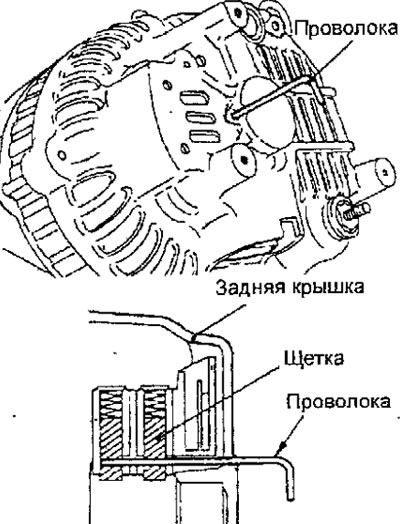
Fig. 19.21. Installing the wire to fix the brushes in the retracted position
Repair of the generator of the gasoline engine 4G1
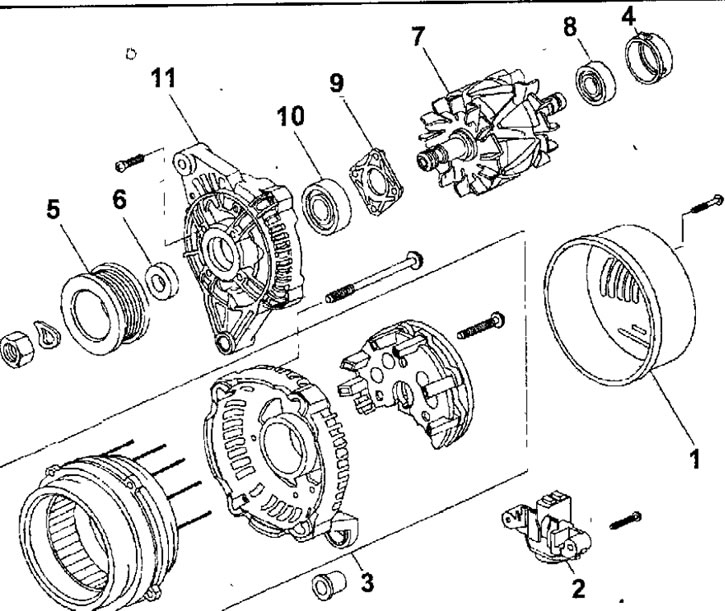
Fig. 19.22. Generator of gasoline engine 4G1:1 - generator rear protective cover: 2 - brush holder assembly; 3 - stator and rectifier; 4 - bearing cap; 5 - generator pulley; 6 - spacer washer; 7 - rotor assembly; 8 - rear bearing: 9 - bearing holder; 10 - front bearing; 11 - front cover
Disassembly
- Remove the screws and remove the rear protective cover of the generator.
- Remove the screws and remove the brush holder.
- Remove the screws and remove the stator and rectifier.
- Remove the bearing cap.
- Secure the front cover of the generator in a vice with soft jaws.
- Use a hex key to hold the rotor shaft from turning and loosen the nut (Fig. 19.23). Unscrew the nut and remove the pulley.
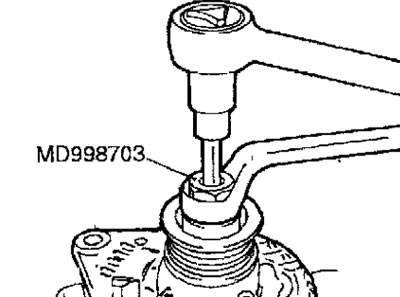
Fig. 19.23. Using a hex key to hold the rotor shaft from turning and loosening the pulley mounting nut
- Remove the spacer washer.
- Remove the rotor assembly.
- Remove the rear bearing.
- Remove the bearing retainer.
- Remove the front bearing.
Checking the rotor
- Check for a break in the rotor winding. Check for conductivity between the rotor slip rings of the generator (Fig. 19.24). If the resistance is too low (tends to 0), this means there is a short circuit. In the event of a break in the rotor winding circuit or a short circuit, replace the rotor assembly.
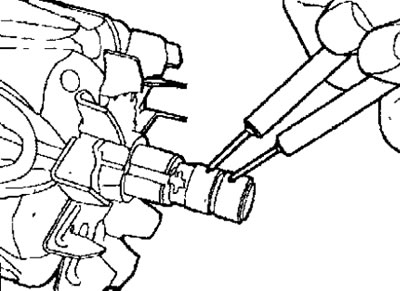
Fig. 19.24. Checking the conductivity between the slip rings of the generator rotor
Resistance: 2.6 Ohm
- Check for short circuit of rotor winding to rotor core (Fig. 19.25). Check for conductivity between slip ring and core. If circuit is shorted, replace rotor.
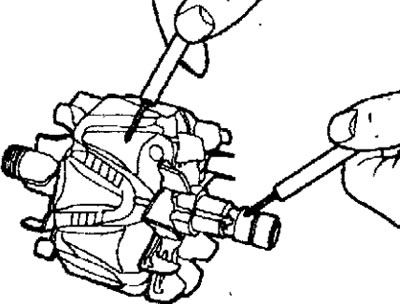
Fig. 19.25. Checking for absence of short circuit between the slip ring and the rotor core
Stator check
- Check for open circuits in the stator windings. Check that there is no open circuit between terminals (A)-(B), (C)-(D) and (E)-(F) (Fig. 19.26).
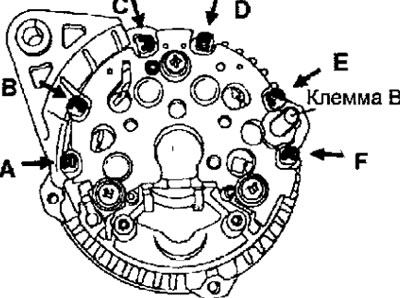
Fig. 19.26. Location of stator winding terminals
- Check for short circuits between the stator windings and the stator core. Make sure that the circuit between each stator winding terminal and the core is open. If the circuit is shorted, replace the stator and rectifier.
Checking the rectifier
- Check the continuity between terminal B and the stator winding terminals (A), (C) and (E) (see Fig. 19.26). A short circuit in both directions indicates a diode breakdown, so the stator and rectifier must be replaced.
- Check the continuity between the stator winding terminals (B), (D), (F) and ground. A short circuit in both directions means a diode breakdown, so the stator and rectifier must be replaced
Replacing brushes
- If the brush is worn down to the center of the mark (3 mm from the center of the brush holder), replace the brush holder (Fig. 19.27).
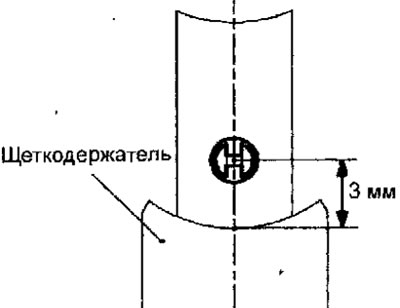
Fig. 19.27. Checking the wear of the generator brushes
Assembly
- Assembly is carried out in the reverse order of removal.