
Removing
To remove the drive shaft, perform the following operations.
1. Remove brake hose retainer, wheel speed sensor wire connector (vehicles with ABS) and a stabilizer bar.
2. Using a special device to keep the hub from turning, unscrew the drive shaft mounting nut.
Attention! When you loosen the driveshaft nut, the wheel bearing must not be loaded by the weight of the vehicle.
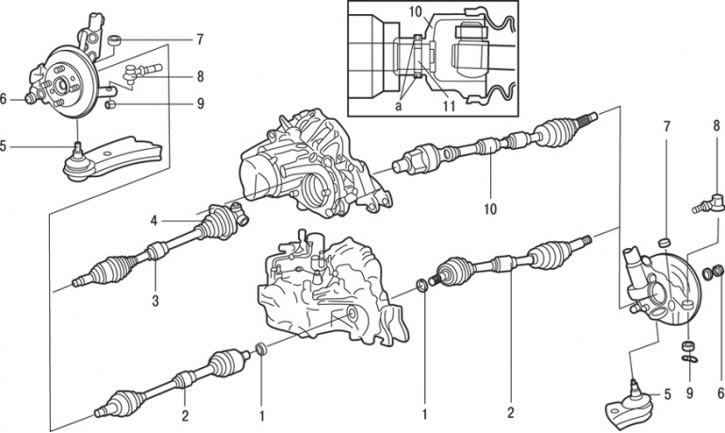
Pic. 15.14. Drive shaft: a - places for applying sealant; 1 - split lock ring (vehicles with automatic transmission); 2 - drive shaft (vehicles with automatic transmission); 3 - left drive shaft (cars with manual gearbox); 4 - bolt (25 Nm); 5 - connection of the finger of the ball bearing of the lower arm with the steering knuckle; 6 – a nut of fastening of a power shaft (216–255 Nm); 7 - nut (67 Nm); 8 – connection of a tip of steering draft; 9 - nut (25 Nm); 10 - right drive shaft (vehicles with manual transmission); 11 - split pin
3. Remove the nut securing the lower arm ball joint pin to the front suspension strut. Using a puller, remove pin 5 (pic. 15.14) ball joint from the steering knuckle.
4. Remove the nut securing the ball joint pin of the tie rod end to the front suspension strut. Using a puller, remove pin 8 of the ball joint.
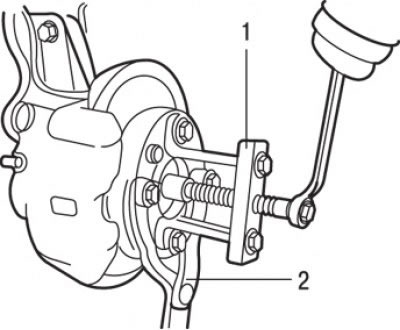
Pic. 15.15. Using Special Tools MB990241 (1) and MB990767 (2) for extruding the drive shaft shank from the hub
5. Using special tools, press the driveshaft shank out of the hub (pic. 15.15).
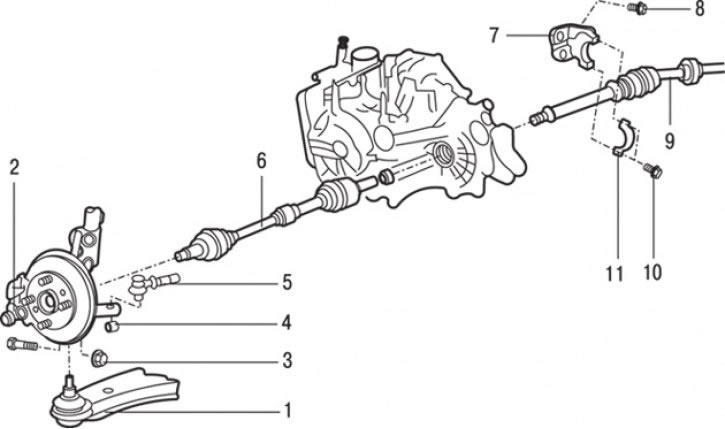
Pic. 15.16. Drive shaft for vehicles with F9Q engine: 1 - connection of the pin of the ball joint of the lower suspension arm with the steering knuckle; 2 – a nut of fastening of a power shaft (218–255 Nm); 3 - nut (90 Nm); 4 - nut (29 Nm); 5 - connection of the pin of the ball joint of the tie rod end with the steering knuckle; 6 - left drive shaft; 7 - bearing bracket; 8 - bolt (60 Nm); 9 - intermediate shaft and right drive shaft; 10 - bolt (25 Nm); 11 – a collar of an arm of the bearing
6. On models with the F9Q engine, disconnect the speedometer drive cable, anti-roll bar and side lower cover. Then unscrew the two bolts securing the clamp of the intermediate shaft bracket and remove the clamp (pic. 15.16). If necessary, unscrew the two bolts and remove the bracket.
Removing the drive shaft is carried out as follows.
Vehicles with manual transmission
Remove the bolt (left), remove split pin (on right) and remove the drive shaft from the gearbox.
Vehicles with automatic transmission
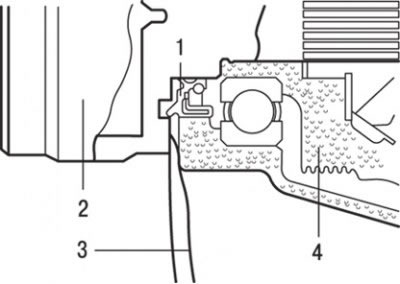
Pic. 15.17. Using the lever to remove the drive shaft: 1 - stuffing box; 2 – hinge type TJ; 3 - mount; 4 - gearbox housing
1. To remove the drive shaft, insert a pry bar between the gearbox housing and the drive shaft (CV joint housing) (pic. 15.17) and push the shaft out of the gearbox.
Attention! It is forbidden to pull out the drive shaft without a mount; such an operation will damage the CV joint type «tripod» (T.J.). To avoid damaging the seal, do not insert the pry bar too deep.
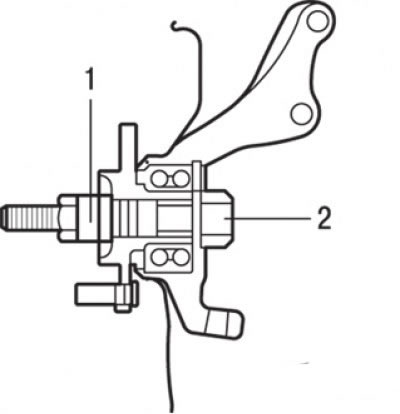
Pic. 15.18. Using the special tool MB991000 (1) and MB99101 (2) for temporary fixation of the hub on the bearing
When loosening the drive shaft mounting nut, the hub bearing must not be loaded with the weight of the vehicle. However, if you need to move the car to another location (the bearing must be loaded with the weight of the car), then temporarily tighten the nut with the special tool (pic. 15.18).
2. Using a punch, knock out the split pin 11 (see fig. 15.14).
3. Remove the right drive shaft 10 from the gearbox (cars with manual gearbox).
4. Remove drive shaft 2 from the gearbox (vehicles with automatic transmission).
5. Remove the circlip 1 from the shaft (vehicles with automatic transmission).
Attention! On vehicles with ABS, when removing and installing the drive shaft, special care must be taken not to damage the wheel speed sensor rotors mounted on the outer CV joint housings «Bierfeld» (B.J.).
Installation
Installation is carried out in the reverse order of removal, taking into account the following.
1. Install the drive shaft into the hub and into the gearbox. When installing the shaft into the transmission, apply multipurpose grease to the shaft splines on the transmission side and ensure that the split pin hole on the end of the drive shaft aligns with that of the transmission shaft. If these holes are slightly out of alignment, rotate the drive shaft 180°and reattach the drive shaft to the transmission shaft.
Attention! Due to the odd number of splines on the drive shaft, when the drive shaft is rotated 180°, the slotted pin hole will be offset by half the diameter of the pin hole.
2. Apply Mitsubishi genuine part MD970389 sealant to the split pin and then insert it into the hole of the drive shaft. After installing the pin, apply sealant on both sides of the pin holes to completely seal them.
3. On models with an F9Q engine, install the two bracket mounting bolts. Then install the intermediate shaft and clamp and tighten the two bolts securing the clamp of the intermediate drive shaft bracket (see fig. 15.16).
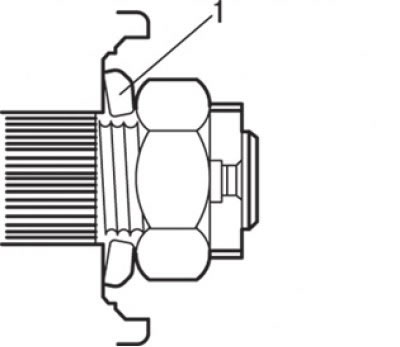
Pic. 15.4. Correct washer installation (1) under the drive shaft nut
4. The washer for the drive shaft mounting nut must be installed as shown in fig. 15.4 (convex side to the nut).
5. Tighten the drive shaft nut with a torque wrench.
Attention! Before final tightening of the driveshaft mounting nut, make sure that the hub bearing is not under the force of the vehicle's gravity.
6. Install the brake hose retainer, wheel speed sensor wire connector (vehicles with ABS) and a stabilizer bar.
7. Connect the speedometer drive cable, anti-roll bar and side lower cover.